Uninstall Tool – 不要なアプリケーションを完全に削除するための多機能プログラムです。このプログラムは、主にタスク実行の速度において類似のプログラムとは異なります。Install Trackerは、迅速かつ安全かつ効率的にオペレーティングシステムのチェックを実行します。分析結果に基づいて、結果の並べ替えは、サイズ、インストール日、ファイル名の3つの主要パラメータで提供されます。Uninstall Toolアンインストーラの機能 内蔵の検索機能により、Install Trackerを使用すると、
説明
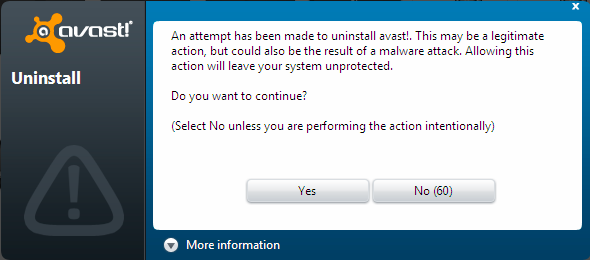
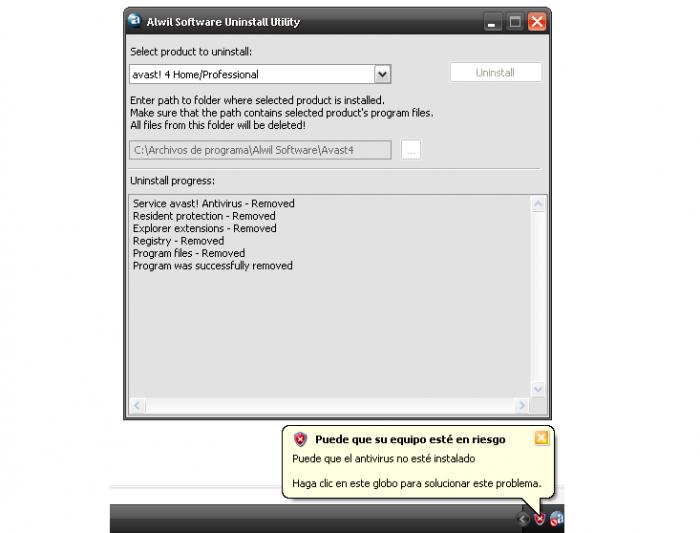
Avast! Uninstall Utility is used for uninstalling the antivirus of the same name.
Removing an antivirus from a personal computer is not an easy task. Sometimes you have to completely reinstall the operating system to get rid of it. And the result is not always what we expect. The best option for removing an antivirus is to use a special uninstaller program. Here, each company works for itself. Only the developers themselves know all the smallest details of their products and are able to safely remove the antivirus from the personal computer. Among all the features of the Avast! Uninstall Utility program, several of the most basic ones can be highlighted. Firstly, only this application is able to remove the Avast! antivirus and all its components from your personal computer.Features of the avast! Uninstall Utility uninstaller
Secondly, Avast! Uninstall Utility works in safe mode, which prevents damage to your operating system. Thirdly, the application ensures stable system operation. Fourthly, this utility is easy to use, requiring no special skills from you. And fifthly, the program provides hints and guides the user during the process. This makes using the program in question even easier and more pleasant.
If you had Avast! antivirus and you would like to remove it, we recommend you download the Avast! Uninstall Utility uninstaller for free on our website. The utility will guaranteed solve your problem.
スペック
| バージョン | 9.0 |
| Platforms | Windows, macOS |
| Developer | AVAST SOFTWARE |
| サイズ | 506 Кб |
| ライセンス | Free |
| Views | 455 |
From this category
もっと見るFinal Uninstallerは、不要なファイルを検出して削除することを主なタスクとする多機能製品です。スキャン中に、アプリケーションは削除されていないファイルや、以前に誤って削除されたファイルを自動的に識別します。パソコンからプログラムを誤って削除した結果、システムに不要なファイルの残骸が散らかります。そのような散らかりは悪影響を及ぼします。最悪の場合、コンピュータの動作が遅くなったり、フリーズしたりします。
Puran Utilitiesは、オペレーティングシステムのクリーニングとチューニングのために設計されたツールセットです。Puran Utilitiesには20以上の異なるプログラムが含まれており、パソコンのオペレーティングシステムの完全なメンテナンスを提供します。これにより、現在利用可能な最も機能的なユーティリティの1つとなっています。Puran Utilitiesのおかげで、パソコンのパフォーマンスを向上させるだけでなく、オペレーティングシステムの重要なパラメータを設定することが保証されます。
あなたのアンインストーラーは、コンピュータプログラムを削除するための最新のユーティリティです。このアプリケーションは、Windowsオペレーティングシステムの標準のアンインストーラではプログラムを完全に削除できない場合に、ユーザーにとって非常に役立ちます。パソコンのメモリが散らからないように、またパソコン自体が遅くならないように、定期的なクリーンアップを実行する必要があります。この用途に最適です。アンインストーラー「あなたのアンインストーラー」の特徴:プログラムの機能はかなり充実しています。まず、ユーティリティは必要なプログラムを完全に削除します。
Popular downloads
もっと見るWindows Movie Maker - さまざまなエフェクトを追加して、素早く便利に動画を作成・編集できます。Microsoft Windowsに含まれていますが、代替となるWindows Movie Makerは、Microsoftの無料Windows Liveソフトウェアパッケージの一部です。Windows Movie Makerの機能: さまざまなソース(カムコーダー、携帯電話、デジタルビデオカメラ、デジタルカメラなど)からビデオをキャプチャします。Windows Movie Makerで動画を作成する際、背景のオーディオトラックを追加したり、間で使用したりできます。
Starus File Recoveryは、さまざまなメディアから削除されたデータを復元できるプログラムです。このプログラムを使用すると、さまざまな方法で失われたファイルを復元できます。たとえば、ごみ箱を経由せずに削除されたもの、悪意のあるソフトウェアによって隠されたもの、ソフトウェアの障害により失われたもの、ごみ箱を完全に空にした場合、フォーマット、またはハードドライブの削除によるものなどです。このプログラムは、ハードドライブ、SSなどのさまざまなデバイスで効果的に動作します。
Pascal ABC.NETは、Microsoft.NETプラットフォーム上でDelphi言語(Object Pascal)で記述されています。これには、PT4問題集や、学校の情報科学でプログラミング学習時に使用される製図家とロボット実行者のツールが含まれています。Pascal ABC.NETプログラミングシステムの主な目的は、現代のプログラミング言語の学習と教育です。特長:このプログラムは、Pascal言語を使用した完全なプログラミングシステムです。開発は、よく知られたプラットフォームMicros上で行われます。