Dedaulus 시스템 클리너는 컴퓨터에서 불필요하고 중복된 데이터(임시 파일, 끊어진 링크, 문서 기록, 방문한 웹 리소스, 쿠키 등)를 적절히 정리하는 배치 애플리케이션입니다. 이 프로그램은 하드 디스크 공간을 확보하고 자동 실행을 구성하여 장치의 성능을 크게 향상시킵니다. Dedaulus 시스템 클리너와 함께 컴퓨터에 특정 수의 특수 마스크가 사전 설치되어 있으며, 사용자가 편집할 수 있습니다.
설명
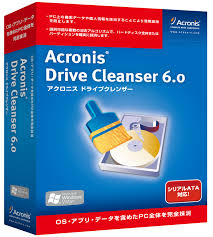
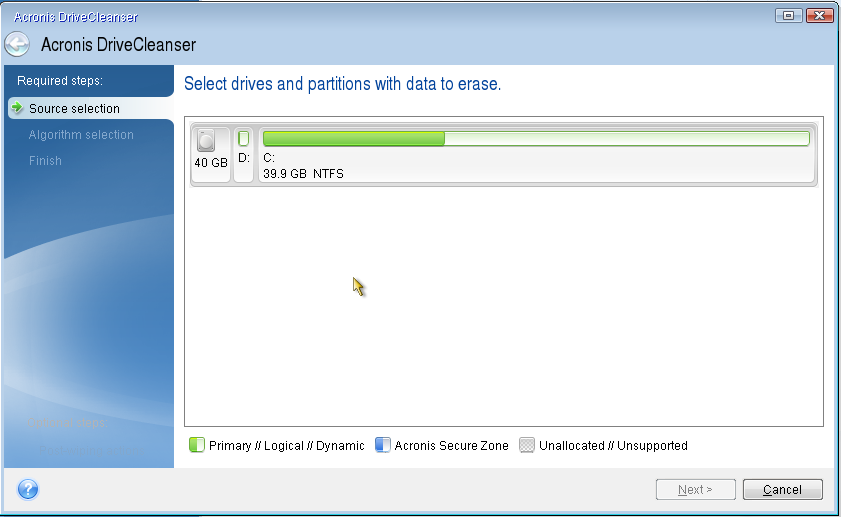
Acronis Drive Cleanser easily and thoroughly cleans your hard drive of unnecessary data. You can, of course, delete information using tools built into the operating system, but in that case you will have no guarantee that confidential files are erased completely and irreversibly.
How to install Acronis?
After all, if someone wants, they can use special applications or other means to extract secret data even after cleaning your computer's memory. For complete file elimination, a utility specializing in such processes must be developed based on sufficiently complex algorithms. This is exactly how Acronis Drive Cleanser software is created.
Main features of Acronis Drive Cleanser:
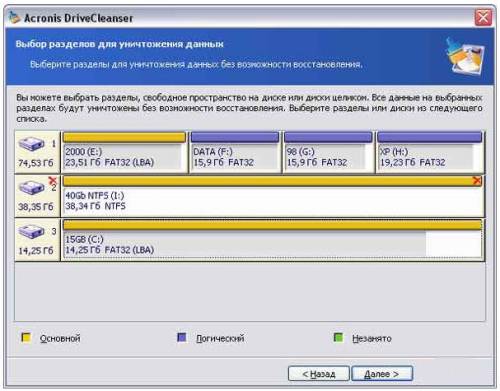
- Deletes all information and partitions stored on hard drives
- The program features a very convenient wizard-style interface reminiscent of the simple Windows XP operating system
- Along with cleaning a media partition or an entire disk, it can also format them
- The demo version of the software has a number of limitations. It gives the user the opportunity to experience the capabilities related to eliminating information using custom or built-in algorithms. However, all real data destruction actions are prohibited. The demo version can be used at the initial stage as a training tool, and if you accidentally select the wrong files for deletion due to inexperience, nothing terrible will happen. After all, this version of the utility will not allow anything to be erased.
- The built-in DiskViewer application allows you to view the result of running a cleaning scenario
사양
| 버전 | 6.0 |
| Platforms | Windows, macOS |
| Developer | Acronis |
| 크기 | 5.94 Мб |
| 라이선스 | Free |
| Views | 610 |
From this category
더 보기Windows 7 Manager는 Windows 7에 특화되어 설계되어, 작동 중 오류나 불일치 가능성을 제거합니다. 레지스트리 청소 및 복구, 시스템 조정은 특별한 주의와 세심함이 필요하며, 운영 체제에 특수 기능을 추가하면 잠재적인 문제를 방지하는 데 도움이 됩니다. 이 프로그램은 영어로만 제공되지만, 간단하고 직관적인 인터페이스 덕분에 스스로 쉽게 조작 방법을 이해할 수 있습니다. Windows 7 M
VitRegistryFix는 일부 경쟁 제품보다 빠르지는 않지만, 시스템이나 레지스트리에서 가장 사소하고 위장된 문제까지 찾아내고 수정합니다. 품질과 속도 사이에서 선택해야 한다면 당연히 품질에 우선권이 주어져야 합니다. 오래된 파일로 과부하된 레지스트리 문제는 매우 쉽게 해결할 수 있습니다. 그러기 위해서는 저희 웹사이트에서 VitRegistryFix를 무료로 다운로드하기만 하면 됩니다. 이 소프트웨어는 레지스트리와 시스템에서 오류를 깊이 자동 검색합니다.
Popular downloads
더 보기Windows Movie Maker - 다양한 효과를 추가하여 빠르고 편리하게 비디오를 만들고 편집합니다. Microsoft Windows에 포함되어 있으며, 대안인 Windows Movie Maker는 Microsoft의 무료 Windows Live 소프트웨어 패키지의 일부입니다. Windows Movie Maker의 기능: 다양한 소스(캠코더, 휴대폰, 디지털 비디오 카메라, 디지털 카메라 등)에서 비디오를 캡처합니다. Windows Movie Maker에서 비디오를 만들 때 배경 오디오 트랙을 추가하고, 사이에 사용할 수 있습니다.
Starus File Recovery는 다양한 미디어에서 삭제된 데이터를 복구할 수 있는 프로그램입니다. 이 프로그램을 사용하면 다양한 방식으로 손실된 파일을 복원할 수 있습니다. 예를 들어, 휴지통을 거치지 않고 삭제된 파일, 악성 소프트웨어에 의해 숨겨진 파일, 소프트웨어 오류로 인해 손실된 파일, 휴지통 완전 비우기, 포맷 또는 하드 드라이브 삭제 등으로 인해 손실된 파일을 복구할 수 있습니다. 이 프로그램은 하드 드라이브, SS와 같은 다양한 장치에서 효과적으로 작동합니다.
Pascal ABC.NET은 Microsoft.NET 플랫폼에서 Delphi 언어(Object Pascal)로 작성되었습니다. 여기에는 PT4 문제집과 학교 컴퓨터 과학에서 프로그래밍 학습 시 사용되는 기안자(Draftsman) 및 로봇 실행자(Robot)를 위한 도구가 포함되어 있습니다. Pascal ABC.NET 프로그래밍 시스템의 주요 목적은 현대 프로그래밍 언어의 학습과 교육입니다. 기능 이 프로그램은 Pascal 언어를 사용하는 완전한 프로그래밍 시스템입니다. 개발은 잘 알려진 플랫폼 Micros에서 이루어집니다.