
설명
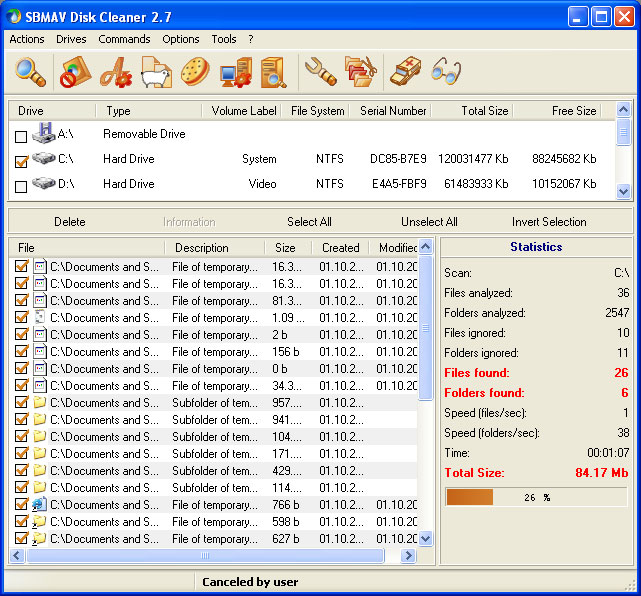
SBMAV Disk Cleaner will help you clean your storage media from extraneous and unnecessary information. Once you install this application on your computer, you can easily find temporary files (both those of the system as a whole and those of individual programs) and delete them.
You will get rid of incorrect shortcuts on your desktop, unnecessary folders, documents, programs, and settings for websites you haven't visited in a long time. The latter typically store email addresses, credit card numbers, and phone numbers.
As for user files, they can also be identified and deleted.
Main Features of SBMAV Disk Cleaner
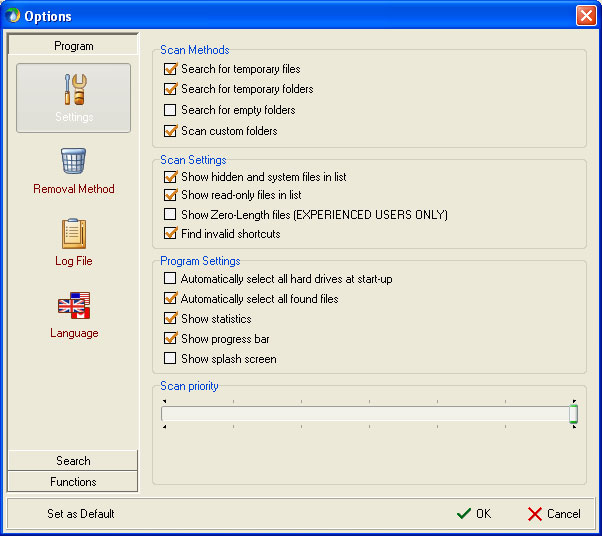
- Working with temporary documents, specifically searching for and deleting them. During standard cleaning, information from standard folders is often erased. However, hard drives contain a lot more useless data that only hinders the proper operation of the system. This application handles such documents as well.
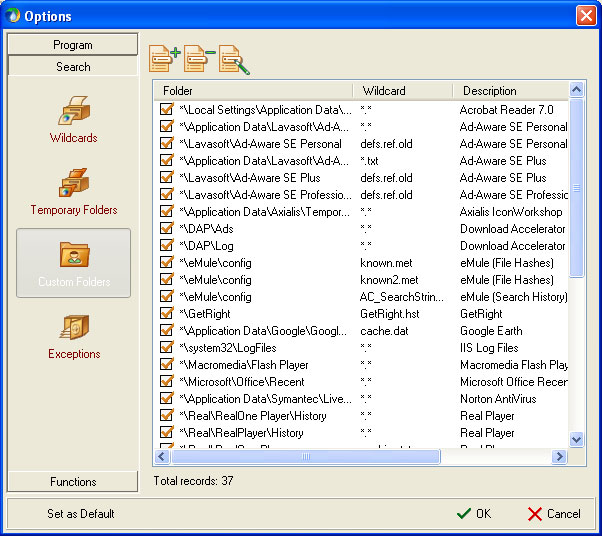
- Scanning disks using the unique MAVQSM™ system. Moreover, it is performed literally in a matter of seconds, saving you time. Folder scanning is compatible with Ad-Aware SE Personal, Accelerator Plus, Norton AntiVirus, GetRight, Ad-Aware SE Professional, Macromedia Flash Player, Acrobat Reader, Download eMule, Sun Java, Remote Desktop, Ad-Aware SE Plus, ZoneAlarm, Google Earth, Tivo Desktop, Axialis IconWorkshop, Opera, Real Player, SpyBot Search and Destroy, and others.
- Software uninstallation. This is an analogue of the built-in operating system feature with additional capabilities. This option lets you get rid of several unnecessary utilities at once.
- A download manager that creates, deletes, enables, and disables processes.
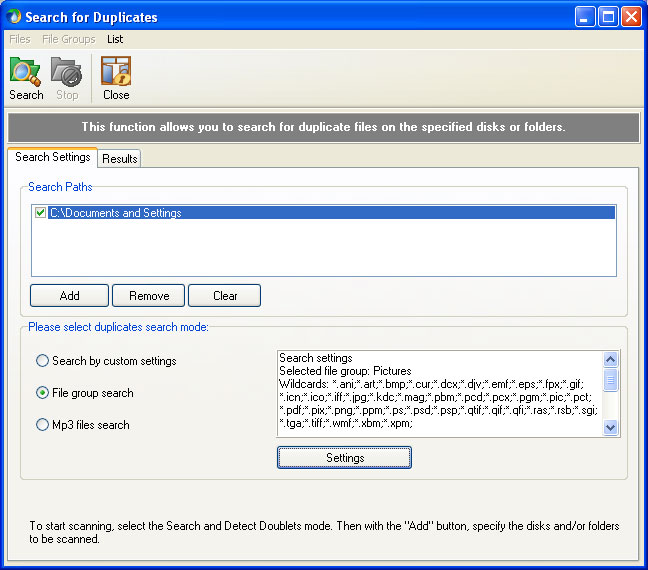
- Searching for duplicates using various criteria.
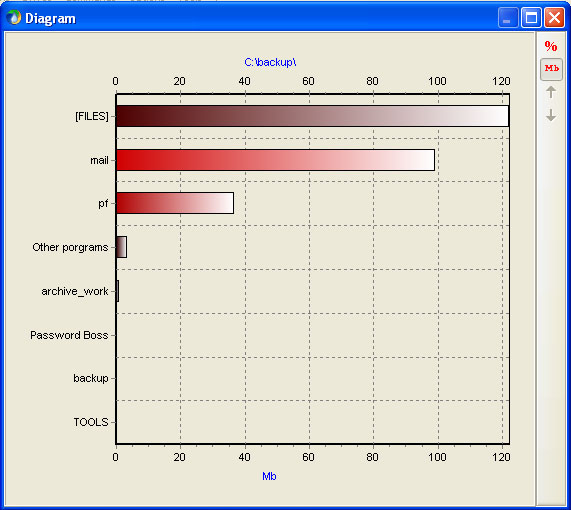
- Using the space analyzer available on the media, it identifies the smallest and largest folders.
- The program deletes information in several ways: standard deletion, moving to the Recycle Bin, and irreversible deletion.
Screenshots
사양
| 버전 | 3.5 |
| Platforms | Windows, macOS |
| Developer | SBMAV Software |
| 크기 | 6.52 Мб |
| 라이선스 | Free |
| Views | 595 |
From this category
더 보기
Disk Write Copy는 시스템 오작동 시 운영 체제를 복원할 수 있습니다. Disk Write Copy를 사용하면 출처를 알 수 없는 프로그램도 컴퓨터에 위협이 되지 않습니다. 시스템 장애가 발생하면 재시작 시 모든 정보가 복원됩니다. Disk Write Copy의 주요 기능: 악성 애플리케이션, 트로이 목마 및 웜의 침투 및 저장을 방지하여 컴퓨터에 저장된 정보를 보호합니다. 가능
PC-3000 DiskAnalyzer는 일반적으로 연결된 드라이브(SCSI, HDD, 외장 USB HDD/Flash, SATA, SSD)를 테스트합니다. 디스크 장치에 액세스하기 위해 응용 프로그램은 다음과 같은 도구를 사용합니다: SCSI Pass Through IOCTL(SPTI) – 기록된 정보를 읽는 작업을 담당하고 SCSI 패스포트, 즉 디스크 식별 데이터에 액세스를 제공하는 메커니즘입니다. S.M.A.R.T. IOCTL은 S.M.A.R.T. 상태에 대한 정보를 제공합니다. 필요한 경우 임계값을 읽고 명령을 실행합니다.
DMDE (DM 디스크 편집기)는 플로피 디스크와 하드 디스크에 저장된 정보를 복구 및 편집하는 데 필요합니다. 또한 논리 드라이브와 해당 파티션을 복구하는 데 도움을 줍니다. 이 프로그램은 컴퓨터에 설치할 필요가 없으며, 모든 미디어에 저장하기만 하면 됩니다. 디스크 편집기를 포함하며, 다음 모드에서 작동합니다: 파티션 테이블; FAT/FAT32/NTFS 부트 섹터; NTFS 파일 시스템 디렉터리; 16진수/텍스트; FAT/FAT32 디렉터리; FAT/FAT32 클러스터 테이블; fa
Popular downloads
더 보기
Windows Movie Maker - 다양한 효과를 추가하여 빠르고 편리하게 비디오를 만들고 편집합니다. Microsoft Windows에 포함되어 있으며, 대안인 Windows Movie Maker는 Microsoft의 무료 Windows Live 소프트웨어 패키지의 일부입니다. Windows Movie Maker의 기능: 다양한 소스(캠코더, 휴대폰, 디지털 비디오 카메라, 디지털 카메라 등)에서 비디오를 캡처합니다. Windows Movie Maker에서 비디오를 만들 때 배경 오디오 트랙을 추가하고, 사이에 사용할 수 있습니다.

Starus File Recovery는 다양한 미디어에서 삭제된 데이터를 복구할 수 있는 프로그램입니다. 이 프로그램을 사용하면 다양한 방식으로 손실된 파일을 복원할 수 있습니다. 예를 들어, 휴지통을 거치지 않고 삭제된 파일, 악성 소프트웨어에 의해 숨겨진 파일, 소프트웨어 오류로 인해 손실된 파일, 휴지통 완전 비우기, 포맷 또는 하드 드라이브 삭제 등으로 인해 손실된 파일을 복구할 수 있습니다. 이 프로그램은 하드 드라이브, SS와 같은 다양한 장치에서 효과적으로 작동합니다.


Pascal ABC.NET은 Microsoft.NET 플랫폼에서 Delphi 언어(Object Pascal)로 작성되었습니다. 여기에는 PT4 문제집과 학교 컴퓨터 과학에서 프로그래밍 학습 시 사용되는 기안자(Draftsman) 및 로봇 실행자(Robot)를 위한 도구가 포함되어 있습니다. Pascal ABC.NET 프로그래밍 시스템의 주요 목적은 현대 프로그래밍 언어의 학습과 교육입니다. 기능 이 프로그램은 Pascal 언어를 사용하는 완전한 프로그래밍 시스템입니다. 개발은 잘 알려진 플랫폼 Micros에서 이루어집니다.