Sometimes in the Google Chrome browser, Flash Player crashes or burdens the browser itself, for this we have described in detail 3 steps on how to optimize Flash Player's performance for the fastest possible operation in the browser. By the way, those who haven't yet downloaded the Google Chrome browser - you can download it from our website on this page.
For the fastest possible performance of Flash applications in the Google Chrome browser, it is very important to configure it correctly. The speed of operation largely depends not on the player used in the browser, but on which browser you are using.
Google Chrome on Windows has a significant drawback - it cannot automatically configure the Flash plugin for maximum speed. We strongly recommend performing the correct settings manually. This will take 3-4 minutes.
Step 1.
Update the Google Chrome browser (chrome://help).
Step 2.
Download the latest version of the Flash plugin for the Google Chrome browser from the official Adobe website https://get.adobe.com/en/flashplayer/?fpchrome
Step 3.
Install the Flash player
Step 4. Very important!
Open the Google Chrome browser settings page: chrome://plugins. Here you will see a list of all plugins installed on your browser. At the top of the list there will be a similar entry Adobe FlashPlayer (2files) - Version: 11,5,502, 146.
If the number of files in parentheses is more than one, then you need to perform the settings; if there is no square with a plus sign for "Details" next to it, then all settings are done, and after reloading the browser with the Flash application you can continue working with the Flavion Builder program.
If such a square exists, by clicking it you will see a list of all Flash plugins connected to your browser. Only one of them should be enabled; otherwise, your system will use multiple processes when running the application, which will significantly slow down the program's performance.
What needs to be done?
Disable all enabled plugins except one located in the Windows\ system 32\ folder, as it specifically provides maximum speed when running the application. It will look approximately like this:
[caption id="attachment_461" align="aligncenter" width="600"]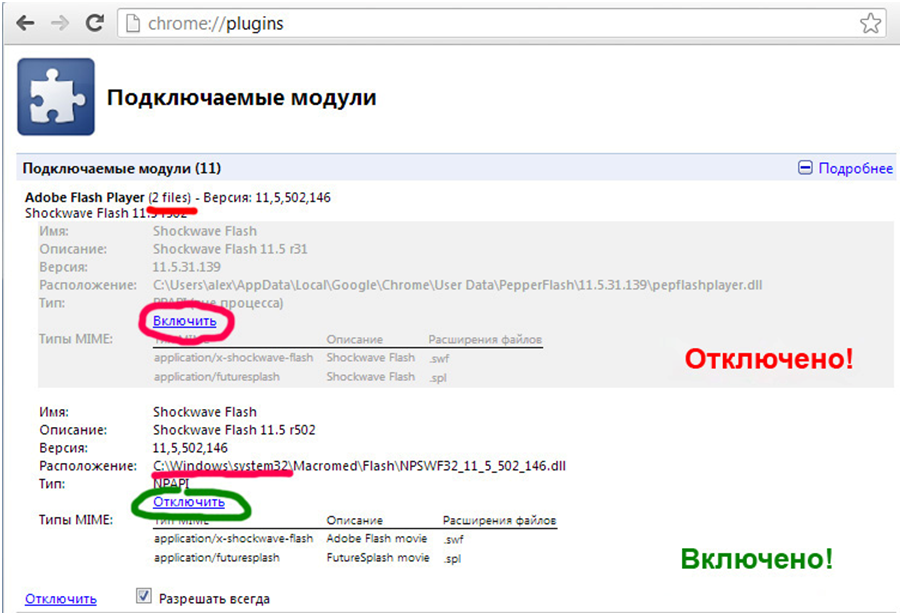 Flash settings for Google Chrome[/caption]
Step 5. Reload the page with the Flash application. The Flash player's performance in the browser should significantly speed up.