Unity 3D with a built-in IDE is a powerful environment for creating applications (real-time architectural visualization and scale; 3D animation) and video games that run on Windows, Blackberry, PS3, OSX, Android, iPod, iPad, Linux, iPhone, iOS; on PlayStation3, Windows Phone, Wii, Xbox360 game consoles. Created applications support OpenGL and DirectX. Program features One of the main advantages of Unity 3D – IDE: in the complex of the general editor, integration of the scene editor with the editor of game objects and edit
GameMaker: Studio
Version 1.4
Description
GameMaker: Studio is used for creating small cross-platform mobile games. The game engine was created by Mark Overmars in the Delphi programming language. A comfortable, intuitive interface ensures efficient and rapid game development for programmers, as they don't need to perform manual coding, saving a huge amount of time on this process.
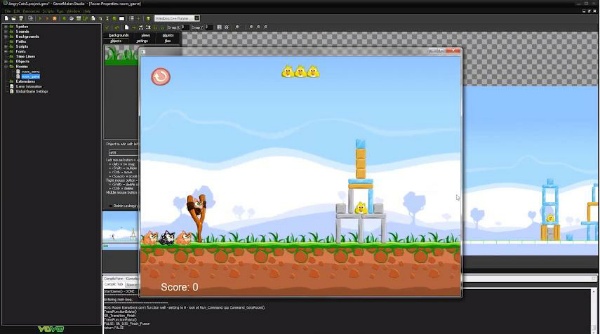
The distribution kit contains a collection of ready-made templates for rooms, sprites, and individual objects. They can be dragged using mouse movements onto the game field, while specifying the conditions of interaction between them.
Who is it for?
If you are a mobile app developer, «GameMaker: Studio» was created just for you! It is one of the most popular engines today for developing apps for any type of platform. This tool was built on the basis of its predecessor «GameMaker». The main difference is the cross-platform capability of its older sibling. Today, «GameMaker: Studio» is a powerful integrated development environment that needs no introduction.
Professional developers have already taken note of the new version of the original tool on the Windows hardware platform. Those who liked the trial version can purchase the Pro version. The Standard edition is unlikely to be sufficient for creating a full‑fledged program, as many modules will need to be purchased separately.
Features
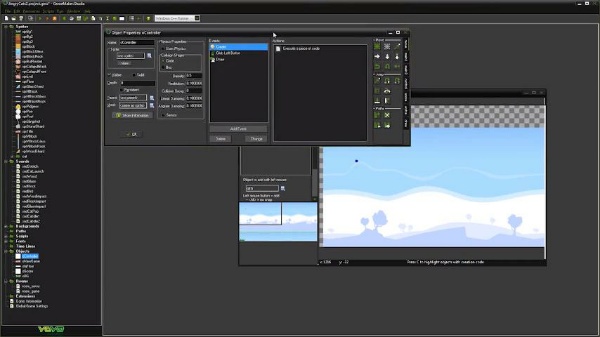
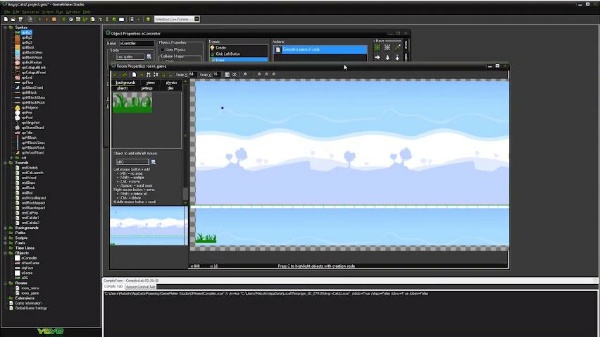
Creating games in «GameMaker: Studio» is easy, even if you don't know basic programming languages. Using a principle similar to a graphics editor, you define images and elements, and set their reactions to in-game events. As you work, you will inevitably learn the basic elements and concepts of how programs are created. But to start, you won't need to learn programming languages beforehand.
Keep in mind that the program is geared more towards mobile platforms, though it is not limited to them. If you prioritize creating 3D applications, this program is also not very suitable. It includes some elements for working with 3D graphics, but the selection is limited and does not meet all necessary requirements.
Disadvantages
Creating large games can be problematic because the program is not designed for a large number of complex processes and algorithms. But if your main target is mobile platforms like Android, «GameMaker: Studio» offers a large number of tools for creating, improving, and otherwise working in this area.
Moreover, you can create games that are cross-platform from the start. That is, the created application will immediately be available in both mobile and desktop versions. This feature automatically saves you from having to write the same algorithms multiple times, tailoring them to different operating systems. Keep in mind that the free version allows you to create applications only for Windows OS.
Advantages
Intuitive menus and function key controls. Over time, you get used to the placement of all necessary elements, and the creation process speeds up significantly. At your disposal is a huge menu with everything you need for creativity. These include various objects, images, sounds, and fonts. Any idea or concept you have can be brought to life!
Main features:
- The cross-platform program easily creates games and apps for Android, Windows, Mac, Linux.
- The workspace of this program contains nothing superfluous.
- Small 2D games can be created in just a few hours.
- You can integrate your finished apps with Steam.
- You can incorporate ready-made templates, step-by-step modify objects, paths, sounds, scripts, backgrounds, and create unique and interesting games from all of this.
- The program is perfectly suited for creating apps and games for various mobile platforms.
What's new in the latest version:
- Added support for Android APK Expansion and Mac Retina.
- Updated gamepad support for iOS 7.
- Improved RSS feed for tutorials and demos.
- Bug fixes.
Specifications
| Version | 1.4 |
| Platforms | Windows, macOS |
| Developer | YoYo Games |
| Size | 178.93 Мб |
| License | Free |
| Views | 14 801 |
From this category
Show moreUnreal Development Kit (UDK) - a free powerful engine, a favorable environment for creating games for a huge number of platforms and OS. The program has a set of all tools for creating 3D games, detailed simulations, and advanced visualizations. The UDK engine contains an integrated editing environment UnrealEditor, packages of ready-made sprites, scripts, sounds, textures... Elements can be combined with each other, describe the conditions of their interactions, creating a new game. Program features If you have already
Game Editor - cross-platform open-source program, a 2D game creator program that supports development for many platforms: iPhone, Mac OS X, Windows, iPad, Linux, GP2X, Windows smartphones, Handheld PC, PocketPC. The program's integration with multiple platforms is noted by the well-known Game Discovery developer site. This distinguishes the program from other similar programs: Game Maker, Darkbasic, 3D Gamemaker. Program features In Game Editor, games are created as a combination of game objec
3D Rad gives everyone the opportunity to try their hand at creating 2D/3D games of various genres, physical simulations, and interactive applications. Applications are created in 3D Rad by combining different combinations of objects (elements) and setting up interactions between them. Physics is based on the consideration of object interactions. The program has an option to import models into the developed project (objects can be visually combined when creating systems: cars, airplanes...), a huge number of samples and examples of 3D objects
Popular downloads
Show moreWindows Movie Maker - quickly and conveniently creates and edits videos by adding various effects. Included in Microsoft Windows, the alternative Windows Movie Maker is part of the free Windows Live software package from Microsoft. Features of Windows Movie Maker: Capture video from various sources (camcorders, mobile phones, digital video cameras, digital cameras, etc.). When creating videos in Windows Movie Maker, you can add a background audio track, use between
Starus File Recovery is a program that allows you to recover deleted data from various media. With this program, you can restore files that have been lost in various ways. For example, they were deleted bypassing the Recycle Bin, hidden by malicious software, lost due to software failures, complete emptying of the Recycle Bin, formatting, or deletion of the hard drive. The program effectively works with various devices, such as hard drives, SS
PROMT - leader in offline and online translation, with the most powerful collection of dictionaries and translated language pairs, 60 language pairs. LLC "PROMT" - a leading Russian company, developer of translation systems for private users and corporations. PROMT software provides translation of any text using built-in dictionaries, including both common and specialized terms. Instructions for any devices, in necessary software lacking a Russian interface, or emails from a foreign company
Pascal ABC.NET is written in the Delphi language (Object Pascal) on the Microsoft.NET platform. It includes the PT4 problem book, and tools for the Draftsman and Robot performers, which are used in school computer science when learning programming. The main purpose of the Pascal ABC.NET programming system is the study and teaching of modern programming languages. Features This program is a complete programming system using the Pascal language. Development takes place on the well-known platform Micros