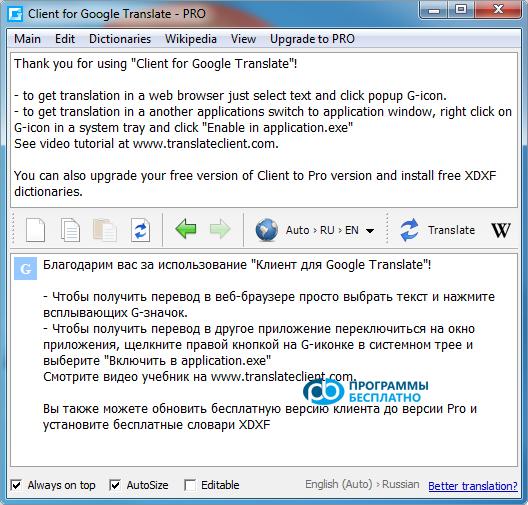
Google Translate Client 6.2.6 – a find for avid "surfers" of the internet space. The program is created based on the popular Google Translate service, which allows high-quality translation between different languages. Our site offers to download Google Translate Client 6.2.6 for free. It will take you just a few minutes, as the program is only 2.4 MB in size.
Advantages
There will also be no problems with installing the software on a personal computer. Almost immediately after installation, you can start using it. Now you can quickly and easily translate texts in any applications and browsers into the language you need.
You can always download the Google Translate Client 6.2.6 program without registration from us in a matter of minutes. You won't need to enter codes or send SMS messages.
For the software to perform the translation, you only need to select a portion of the text document with the mouse. A window will pop up under the cursor, where the text in your desired language will appear.
This application works based on the popular Google Translate service. It is completely free and provides instant translation of texts and web pages. Google's interactive translation service supports a considerable number of languages.
Features
Note that a mandatory condition for Google Translate Client 6.2.6 to work is an active internet connection. Downloading Google Translate Client 6.2.6 for Windows in Russian is not difficult. You just need to visit our website.
On our site, you will find a download link for this program. Note that this software from the global internet giant was introduced to the computer community in 2009. It is compatible with some versions of the Windows operating system family, specifically XP and Vista.
A free application that uses the online service for text translation – Google Translate. Today, the service has the largest database, thus providing the most qualitative translation in many directions.
The program runs on Windows and takes up just a few megabytes. The only condition for quality performance is access to the internet, with minimal traffic consumption. No background consumption occurs.
Completely free, the user can get correct translations without manually searching for words. For translation, you just need to highlight the words, and they will instantly be replaced with the native language or vice versa. The application supports more than 50 languages of the world, so you can communicate with almost anyone.
Program Features
The program has built-in voiceover, so you can not only process the text but also hear its correct pronunciation. The program translates "on the fly", requiring about 1-2 seconds to retrieve data. Transliteration is also supported, and you can choose among alternative translation options if the current expression or word is inappropriate.
When loading text into Google Translate Client, it automatically detects what language has been entered for translation and shows the assumed language. To speed up translation, you can use hotkeys, which must be set in the settings menu.
The program will download updates on its own, they are light, and will keep the client up-to-date. There is also a portable version of the client that can be installed on a flash drive and loaded on any device.
The Pro version somewhat expands the application's functionality: you can translate texts up to 1 million characters, perform searches on Wikipedia. Additionally, over 200 dictionaries are supported.
The program includes a Learner tool that helps memorize words. The developers are actively working on the service, so there is rapid progress in translation quality. Already today, it is possible to translate texts of various fields quite correctly, including specialized ones.