Picasa was created in 2002 by Lifescape, and in 2004 the program was acquired by Google.
It is used for working with digital photos for editing, organizing, printing, and performing other options. The organizer has powerful tools for improving photo quality. The program integrates with the photo hosting services Picasa Web Albums, Google Plus, Blogger, Google Earth, YouTube, and Gmail.
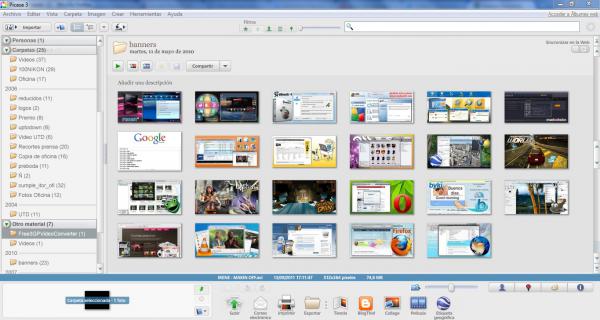
Picasa also allows you to create perfect presentations and beautiful slideshows, collages, and movies from photos, and share them via email, social networks, and web pages. When opened, the program automatically sorts photos found on the PC and organizes them into albums, arranging them by name and date.
By manually tagging a person's name, a user is automatically created. All files in which the person is detected will be moved to the catalog. Additionally, you can enter an email address and send pictures to the selected address.
Advantages
The application is well integrated with social networks. If you tag names in pictures, you can see automatic suggestions based on friends in social networks, but you need to enter slowly so the system has time to process the data.
Picasa has quite a few functions that allow you to process an image or a specific part of it.
The most valuable are:
- Cropping allows you to separate the necessary part of the image;
- Straightening helps to fix crooked photos;
- Red-eye removal eliminates the unwanted effect on eyes when photographing in the dark;
- I'm Feeling Lucky! – this function automatically selects settings and parameters, but whether it will be high-quality will only be shown by practice;
- Retouching helps to correct defects in photos.
Feature
An important feature of the program is the ability to create a collection with face tagging. Picasa can very accurately recognize human facial features in photos and separate different people into individual folders on the PC. Automatic recognition is quite good, but errors in operation are not completely excluded, so if incorrect placement is detected, you can move the image directly from the program.
The functions of automatic correction of contrast level, color type, and lighting are particularly interesting. Other classic tools for working with images are also available in the program.
The most pressing topic is the closure of the Picasa project by Google, as updates and support for the service have been stopped. However, you can download the latest versions of Picasa from us. The program will help save files and prevent their loss in case of blocking Picasa's access to Google services.
Main functionality:
- Upload photos to PC from camera and scanner.
- Auto-indexing of photos on PC hard drives.
- Photo editing: retouching, straightening, and cropping.
- When editing an image, its original is saved in a hidden folder.
- Play photos in full-screen, normal mode, and slideshow.
- Photo tagging and search option.
- Setting a password for Picasa albums.
- Effects and tools for editing digital photos.
- Removes red-eye effects.
- Supports images in: GIF, PNG, PSD, JPG, BMP, TIF formats.
- Supports video file formats: MPG, AVI, WMV, MOV, ASF.
- Send photos via email, social networks, online Picasa albums.
- Supports many photo printing options and formats.
- Geotagging: records coordinates in EXIF metadata.
- Creates backups on DVD and CD.
- Creates posters, collages, videos, web pages from photos.
- Multilingual interface, includes Russian.
Note: During installation, Picasa offers by default to change the browser search engine. Disable unnecessary options during installation, be careful.
Disadvantages
- Does not play animated GIF files.
- Sometimes there are issues with displaying the alpha channel in PNG.
- Cannot create sub-albums within an album.
- Does not display multi-page TIFF files.
- Changing image size is inconvenient: when exporting to another folder.