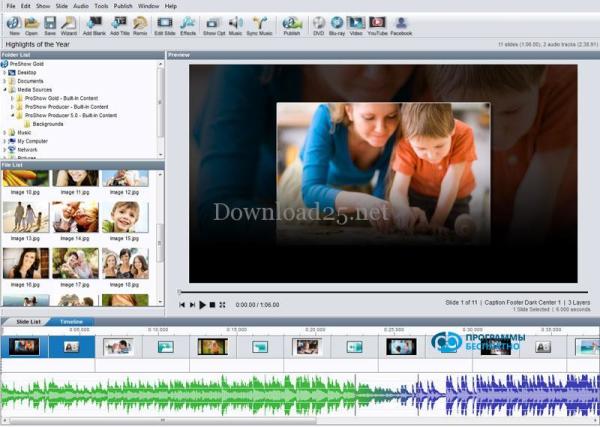
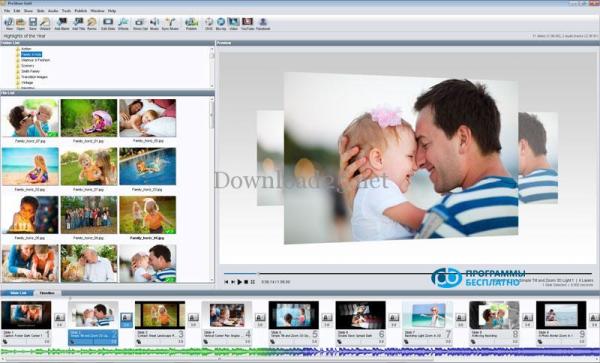
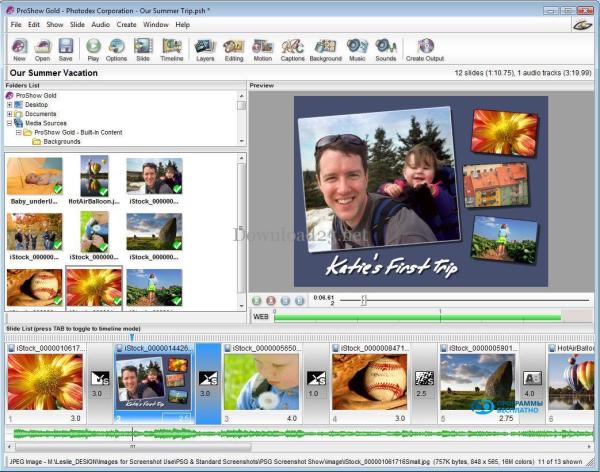
PhotoSHOW - a new and full version of the program for creating videos, musical slideshows with beautiful transition effects. Allows you to insert titles and captions, add an unlimited number of photos, use a design theme, etc. Created slideshows are saved in EXE file formats, screensavers, or videos, including full HD. The PhotoSHOW program has a user-friendly interface in Russian, characterized by intuitive and easy perception. Create a slideshow of perfect quality in just a few minutes! Updated
Description
Proshow Gold is a program for creating and editing presentations. Presentations have long become a part of our lives. If you have returned from a vacation and want to show off your photos, the most original way to do this is by creating a photo presentation with appropriate musical accompaniment. Also, creating slideshows helps office workers prepare materials for an important presentation to their superiors.
There are countless special programs for creating presentations on the internet. We offer you to download Proshow Gold for free to work with slides. This software allows you to apply various graphic effects, including having about three hundred different transitions between images in its assortment. You can also add sound accompaniment.
At first glance, there is nothing special about the Proshow Gold program; it is a very simple utility to use. However, when you delve into the details, all the useful features are revealed – from automatically synchronizing the playback time of the audio accompaniment with the slide show time to exporting the created video. This program has no special system requirements and can be installed on any personal computer. It takes up only 16 MB of memory on your computer's hard drive. Without much effort, you can download Proshow Gold for free on our website and start creating your own slideshow in just a couple of minutes.
This software supports many languages, including Russian. Thanks to the Russian-language interface in the Proshow Gold program, which is simple and easy to use, you can quickly master the utility. After familiarizing yourself with the functional capabilities of the presented program, you will be able to create unique videos on your own.
Any slide presentation consists of three main elements – a selection of photos, audio accompaniment, and configured graphic transitions between slides. Therefore, to start working with the Proshow Gold program, you need to select the photos you will use, and then use the program to choose the appropriate design for them. The composition of the slideshow is important when creating it. To create a masterpiece, you need to carefully think through the details, arrange the images in a logical sequence, and select suitable musical accompaniment.
After you have sorted out the photos, you should pay attention to the track that will be used in the video. You can use your favorite musical composition, or, if desired, record and insert your own audio comments for the slides. If the duration of the selected audio accompaniment is longer or shorter than the slide show time, don't panic. The simplest solution in such a situation is to increase/decrease the display time of each slide or change the number of slides.
The final touch in working on your presentation in the Proshow Gold program is selecting and configuring graphic transition effects between slides. The assortment of transitions is large, and interesting combinations of them will make your presentation even more interesting and attractive. If you are looking for a reliable, multifunctional program for creating great slideshows, then you have found it. You can download Proshow Gold without registration on our website right now.
Specifications
| Version | 6 |
| Platforms | Windows, macOS |
| Developer | Photodex |
| Size | 44.20 Мб |
| License | Free |
| Views | 3 066 |
Reviews
6 reviews
-
Ольга 02.08.2016
Скачивала программу Proshow Gold на Window 7. Все работает. С ее помощью можно гораздо удобнее, легче и быстрее делать свои презентации, также оригинально оформить каждую фотографию.
-
Иван 27.07.2016
Очень хорошая и интересная программа. Благодаря ей я создаю отличные и красивые презентации. Это делается очень легко. Меню понятное и простое. Установка происходит довольно таки быстро.
-
Екатерина 26.07.2016
Скачивала программу Proshow Gold на Window 7. Все работает. С ее помощью можно гораздо удобнее, легче и быстрее делать свои презентации, также оригинально оформить каждую фотографию.
-
Ольга 26.07.2016
Долго искала программу для создания клипов из фото, пока не скачала Proshow. Для меня эта программа оказалась самой легкой и понятной в использовании. Достаточно выбрать необходимые фотографии, музыку и немного пофантазировать с переходами и эффектами. Функционал здесь достаточно широкий для творчества в создании слайд-шоу.
-
Alex_85up 26.07.2016
Прога оказалась удобной. На работе требуют презентации, а пакет MS Office не ставят - дорого. То, что есть в ОпенОфисе не всегда подходит, да и неудобной она кажется. А Proshow Gold освоил за полчаса.
-
Сергей 25.07.2016
Хоть программ для создания презентаций уже достаточно много, я выбрал именно Proshow Gold, так как она достаточно проста в управлении. Она отлично подходит для не очень опытных пользователей, таких как я.
From this category
Show more2Gis (2Gis) - the program can also be found under the name "TuGis". This unique software, after installation, will allow you to use indispensable reference information and view city maps. The directory also contains information about organizations and companies operating in a particular city. With the 2Gis program, you can view a detailed map of any city on any mobile device. Note that you can, if necessary, use the display
Paint.NET is a raster graphics editor for Windows NT, simple yet convenient and powerful. It is based on the Microsoft .NET Framework. An excellent replacement for MS Paint on Windows. Supports formats: PNG, BMP, TIF, JPEG, TGA, GIF, its own PDN format. The application is open as a project developed for Microsoft Windows, under the guidance of Microsoft by students at Washington State University. The program is written in C#, with C++ used for installation and shell integrations. Main functionality of Paint
IrfanView - a small program for viewing video, graphic and audio files. Works with Windows OS, ReactOS, free for non-commercial use. Has a set of tools for editing graphic files. The next version for viewing and converting IrfanView graphic files has been updated. This program supports a large number of video and audio formats. Free download - IrfanView 4.42 right now - without SMS and registration. IrfanView supports possible
Popular downloads
Show moreWindows Movie Maker - quickly and conveniently creates and edits videos by adding various effects. Included in Microsoft Windows, the alternative Windows Movie Maker is part of the free Windows Live software package from Microsoft. Features of Windows Movie Maker: Capture video from various sources (camcorders, mobile phones, digital video cameras, digital cameras, etc.). When creating videos in Windows Movie Maker, you can add a background audio track, use between
Starus File Recovery is a program that allows you to recover deleted data from various media. With this program, you can restore files that have been lost in various ways. For example, they were deleted bypassing the Recycle Bin, hidden by malicious software, lost due to software failures, complete emptying of the Recycle Bin, formatting, or deletion of the hard drive. The program effectively works with various devices, such as hard drives, SS
PROMT - leader in offline and online translation, with the most powerful collection of dictionaries and translated language pairs, 60 language pairs. LLC "PROMT" - a leading Russian company, developer of translation systems for private users and corporations. PROMT software provides translation of any text using built-in dictionaries, including both common and specialized terms. Instructions for any devices, in necessary software lacking a Russian interface, or emails from a foreign company
Pascal ABC.NET is written in the Delphi language (Object Pascal) on the Microsoft.NET platform. It includes the PT4 problem book, and tools for the Draftsman and Robot performers, which are used in school computer science when learning programming. The main purpose of the Pascal ABC.NET programming system is the study and teaching of modern programming languages. Features This program is a complete programming system using the Pascal language. Development takes place on the well-known platform Micros