Setting up the start page in Google Chrome browser
Google Chrome Setup Free

Setting up the start page in Google Chrome browser

3.8 (36 ratings) Hover and click a star to rate
Downloads
0
Size
Rating
3.8 / 5
License
Freeware

Description

The standard welcome page of the Google Chrome browser looks, perhaps, empty and unclear. Now we will figure out what a welcome page is and what it is for.

When you launch the browser, the first thing you see is the start page! It is also called the quick access page, or welcome page.

Welcome page - what is it?

Actually, these are slightly different concepts, especially when it comes to the standard welcome page of the Google Chrome browser.

So, now we know what it is. Let's figure out what it is needed for?

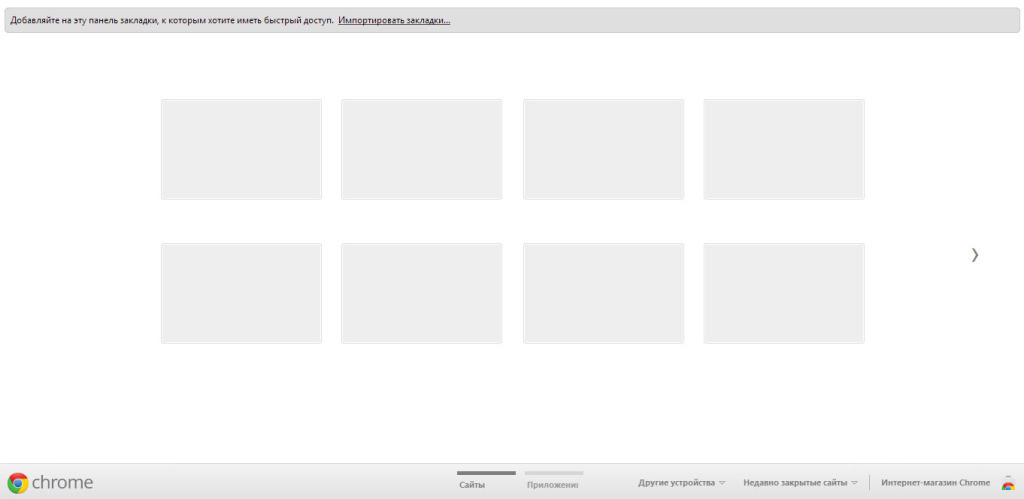
If you have the standard welcome page in your browser, namely, the "Quick Access Page", and you haven't changed anything in it and haven't installed extensions to change the "Quick Access Page", then it will look something like this:
1

Let's start, perhaps, with these little squares that are unclear at first glance. What are they?

These are "tabs" that display your most visited sites. That is why this page is called the "Quick Access Page" (Eng. Speed Dials).

A little above these tabs, we see the bookmarks bar, which displays sites that you have added "To bookmarks". Below the quick access tabs, you can see the menu bar of the Google Chrome browser. As a rule, this bar displays "Sites" and "Installed applications".

How to configure the welcome page?

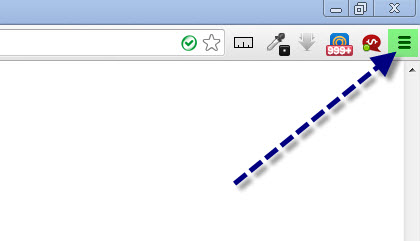
In order to go to the welcome page settings menu of the Google Chrome browser, you must open the "Customize and Control Google Chrome" panel. To do this - launch the Google Chrome browser, move your mouse to the upper right sector of the program and click on the corresponding item:
2

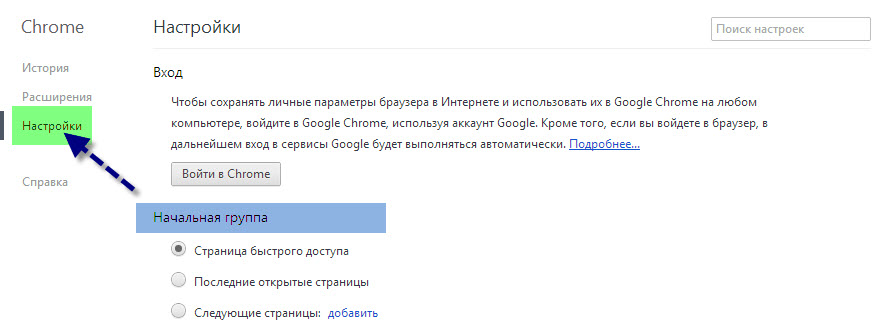
Next... In the context menu that appears, select the "Settings" item. After that, go to the "Settings" tab and in the "On startup" section you will be able to configure the Google Chrome welcome page.
3

Here we see 3 menu items, namely:

  • Quick Access Page - This is the page where your most visited sites and your bookmarks are located.
  • Last opened pages - When you start the browser, the last opened pages will automatically open. That is, those pages that remained open before you closed the browser last time.
  • Following pages - Here you can set up a list of pages that automatically open when the browser starts.

Custom welcome page option in Google Chrome

As we can see, we have no ability to manage the tabs located on the quick access page, and this is inconvenient. Most people are used to having these tabs be manageable, and being able to use them to create their own list of sites for quick access.

As was already mentioned, such a capability exists and it is achieved by installing a special "Google Chrome Extension". That is, there are special extensions, or rather, installable add-ons for the Google Chrome browser that allow you to completely change the quick access page. We will now talk about one of these extensions.

FVD Speed Dials extension for Google Chrome

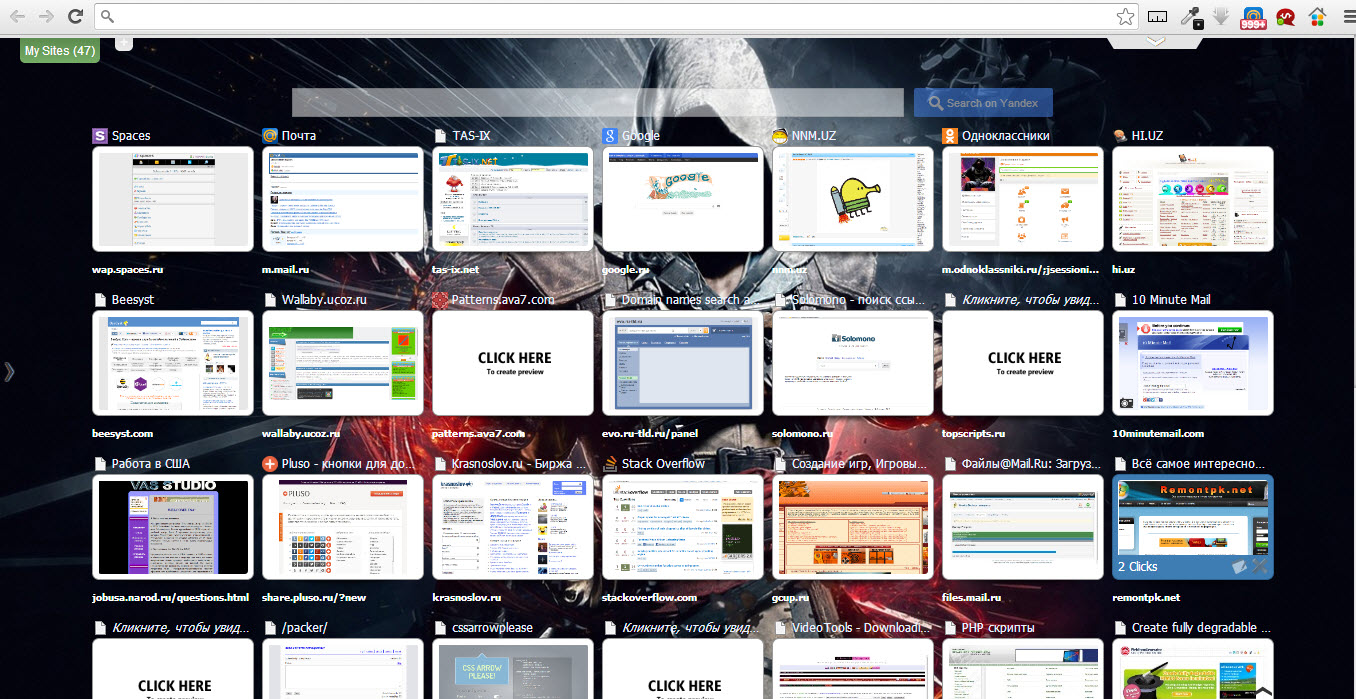
Thanks to the "FVD Quick Access Tabs" extension, you can customize the Google Chrome welcome page to your liking. For example, a quick access page using FVD Speed Dials may look like this:
3
Isn't it beautiful? :)

In addition, using the FVD quick access tabs, you can divide your tabs into "Groups" or, in other words, "Categories". Thanks to this, you can arrange the tabs just the way you want. You are limited only by your own imagination.

Manage your tabs, delete, create, edit, do whatever you want. All of this is possible with the FVD Speed Dials extension.

You can download and automatically install this extension from the Google Web Store.

Summary

As we can see, configuring the Google Chrome browser's welcome page is extremely easy and absolutely everyone can handle this task! Those who haven't yet downloaded the Google Chrome browser, download it here.

Good luck with your endeavors!

Specifications

Size
LicenseFreeware
Views151 556

Reviews

18 reviews

  • rednail 22.09.2017

    никакой автоматической настройки не происходит. приложение установилось и нигде его не видать.

  • Сергей 09.09.2017

    Был простой вопрос: как убрать прямоугольники из chrome? Не вижу ответа. Нельзя или не знаю, так и скажите. Пустые пространные ответы не принимаются. И не надо строить из себя умных и писать все подряд. Чистая новая вкладка из магазина постоянно слетает. Задача, для непонятливых, убрать прямоугольники(визуальные закладки) все остальные функции оставить без изменения.

  • Сергей 18.12.2016

    Забил в поисковике как ИЗБАВИТСЯ от этих "квадратиков" быстрого доступа, ибо есть люди которым нужны они (возможно такие чайники что не могут нормально настроить браузер, что бы вкладки не закрывались после перезапуска или просто закрепить) и есть кому они ненужны не под каким предлогом. Кто ответит мне в комент-взломаю почту, а после восстановления к ней доступа отхватите вирус рекламный. xD

  • стеф 17.11.2016

    Нет такой вкладки- Начальная группа.....

  • Ольга 12.08.2016

    Спасибо огромное! наконец-то смогла установить любимые сайты!

  • Tetris 16.01.2016

    Нажмите Настройки . Если вы используете Chromebook, нажмите "Показать дополнительные настройки" в нижней части страницы.

  • Анна 07.12.2015

    А для мобильных, андроидов ( андроид 4.4) можно как-то менять внешний вид браузера? Вот у меня было удобно, все открытые вкладки в браузере можно было листать и они были эскизами страниц, но потом что-то случилось .. и теперь открытые вкладки только списком... Это очень неудобно, а толковых руководств по настройке к сожалению не найти в интернете.

  • Артур 31.10.2015

    Говно ваш яндекс! Просто ужас! Зачем втюхивать людям этот кал? Я пользуюсь гуглом, но меня насильно пытаются перевести! Зачем????

  • Гуджа 24.10.2015

    Никак, этого нет и вряд ли такое будет в мобильной версии. Если интересно, то почитай хоть немного, прежде чем задавать такие глупые вопросы.

  • мс 11.08.2015

    спасибо хоть кто-то написал как это делать.

  • татьяна 24.06.2015

    спасибо за информацию) все доступно и понятно. теперь работа пойдет быстрее)

  • Любовь 31.05.2015

    Спасибо огромное!!!!!

  • Максим 19.04.2015

    Как убрать вечно надоедливые вкладки "Наиболее посещаемые сайты" из страницы быстрого доступа браузера google chrome v.42.0?

  • Влакс 04.03.2015

    спасибо, статья кстати. Сейчас поставил в Хром стартовую Atavi, отлично работает. Сервис визуалок просто феноменален! удобно - не то слово!

  • Malavita 07.12.2014

    а как в этом, рекомендованном вами расширении, вернуть гугл, как стартовую станицу и поисковую систему. не хочу Яндекс.

  • Sergey 10.10.2014

    Благодарю!

  • Rainen 15.07.2014

    Как это сделать в мобильной версии браузера? Там настроек поменьше, а по умолчанию хром восстанавливает прошлый сеанс со всеми вкладками, что при мобильном инете как-то не очень интересно

  • Anna 31.01.2014

    Спасибо за статью, получилось у себя в браузере Google Chrome - настроить стартовую страницу. Мне сразу понравился способ через расширение, что в итоге и сделала. Могу посоветовать сразу качайте расширение и настраивайте через него, так Вы с экономите кучу времени!

Popular downloads

Show more
Windows Movie Maker

Windows Movie Maker

Video Editors
3.9

Windows Movie Maker - quickly and conveniently creates and edits videos by adding various effects. Included in Microsoft Windows, the alternative Windows Movie Maker is part of the free Windows Live software package from Microsoft. Features of Windows Movie Maker: Capture video from various sources (camcorders, mobile phones, digital video cameras, digital cameras, etc.). When creating videos in Windows Movie Maker, you can add a background audio track, use between

1 061 824 7.02 Мб
Download
Starus File Recovery

Starus File Recovery

Recovery Programs
5.0

Starus File Recovery is a program that allows you to recover deleted data from various media. With this program, you can restore files that have been lost in various ways. For example, they were deleted bypassing the Recycle Bin, hidden by malicious software, lost due to software failures, complete emptying of the Recycle Bin, formatting, or deletion of the hard drive. The program effectively works with various devices, such as hard drives, SS

190 009 14.08 Мб
Download
PROMT

PROMT

English to Russian translators
3.3

PROMT - leader in offline and online translation, with the most powerful collection of dictionaries and translated language pairs, 60 language pairs. LLC "PROMT" - a leading Russian company, developer of translation systems for private users and corporations. PROMT software provides translation of any text using built-in dictionaries, including both common and specialized terms. Instructions for any devices, in necessary software lacking a Russian interface, or emails from a foreign company

46 864 794.00 Мб
Download
Pascal ABC

Pascal ABC

Programming
4.1

Pascal ABC.NET is written in the Delphi language (Object Pascal) on the Microsoft.NET platform. It includes the PT4 problem book, and tools for the Draftsman and Robot performers, which are used in school computer science when learning programming. The main purpose of the Pascal ABC.NET programming system is the study and teaching of modern programming languages. Features This program is a complete programming system using the Pascal language. Development takes place on the well-known platform Micros

41 458 67.70 Мб
Download