Is it worth installing Windows 10? And what is good about the new "Microsoft" product? The creators of "Ten" claim that it is an innovative product, and after trying its capabilities, the user will not want to return to previous versions of Windows.
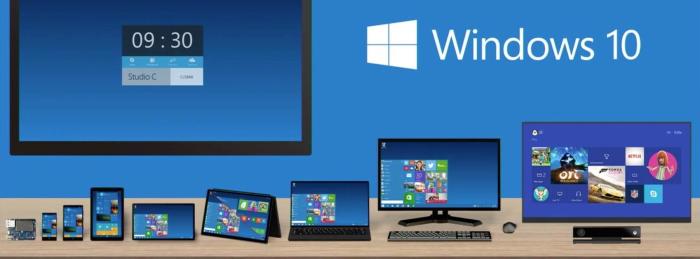
Windows 10 is a convenient, improved analogue of the familiar Windows 7 and Windows 8.1. Let's look at the reasons why you should upgrade to Windows 10.
What are the advantages of Windows 10?
When updating the software, you will not lose the programs installed on your computer. If for some reason the updated OS does not suit you, there is an option to return to the one you had. However, remember: you can return within a month from the moment of installing "Ten".
Is it worth installing Windows 10 and is it convenient for work?
Many users emphasize the stability of this OS. Windows 10 is simple and convenient to use. The system has excellent performance and functions, one might say, "reliably".
Some users still cannot get used to Windows 10 because it is significantly different from previous versions of the OS. "Ten" can be installed on various devices: it can be a PC, laptop, or mobile gadget.
Is it worth upgrading to Windows 10?
To each their own! But as for OS updates, they load automatically (the user does not need to make any effort). Is it worth installing Windows 10 on a personal computer - it's up to you! The reasons to upgrade to Windows 10 are numerous. Let's continue to look at them.
The nuance is that "Ten" does not have the familiar Internet Explorer. Instead, you will find Microsoft Edge. The next advantage is that the new OS has many desktops - this is very convenient for those who need to sort programs.
Use multiple desktops, this way you can organize your files and all important programs. Rest assured, everything will stay in its place! Windows 10 is easy to use thanks to its simplified recovery function, and the touch recognition capability is also enhanced when using a touchpad.
"Ten" allows you to use disk space efficiently. It interacts perfectly with wireless devices and also has reliable parental controls.
According to many users, Windows 10 is convenient and practical, is it worth switching from 7? In any case, you can try: soon you will get used to the new OS and appreciate its advantages. Windows 10 supports modern gaming applications that are not available in older versions.
Disadvantages of the new Windows 10 operating system
So, we have talked about the advantages of the new operating system. Is there any point in switching to Windows 10? Definitely yes. Users have appreciated the reliability of "Ten". But any system has weaknesses - you should not forget about them! Now let's talk about why you should not upgrade to Windows 10.
Many users are unhappy that "Ten" monitors all actions performed on the network: this includes browsing pages and entering passwords.
Is it worth upgrading to Windows 10?
For some, this is a very controversial issue. Data about user actions is sent to the Microsoft department. Windows 10 also controls installed applications and data on the hard drive.
If you own a licensed Windows 7 or Windows 8.1, Windows 10 will be free for you. In other cases, you will need to pay for the product. Windows 10 does not have the familiar "Media Center"; instead, you will find an application with the simple name "Music and Video".
Should you switch to Windows 10? Many have already gotten used to this OS. Remember that when updating, you will not find the standard games that were included in previous versions. "Ten" has updated versions of games with a very beautiful interface.
Windows 10 underwent testing involving more than 5 million people. As a result, the creators and users themselves concluded: the operating system is useful and convenient, but it is not immune to errors and vulnerabilities. The same can be said about other Microsoft products.
Let's note: Windows 10 is in demand and reliable, is it worth switching from 7? This is a reasonable step. The new OS has various reviews. Some people really like the product offered by Microsoft, while others expected something more. Let's note that initially, user opinions were not as positive as the creators would have liked.
Many expressed the opinion that first, Windows 8 should be improved, and only then start creating "Ten".
Reviews of Windows 10
Over time, the innovative Windows 10 received many positive responses. In some cases, users complained that they could not install the necessary drivers. The level of privacy offered by Windows 10 also does not suit everyone. Users say they do not like the "intrusive updates".
However, despite its weaknesses, Windows 10 has its advantages. The number of good reviews is growing. Users have noticed: after installing Windows 10, they started working faster. They also managed to achieve more comfortable interaction with the system.
Is it worth switching to Windows 10?
Many agreed that creating "Ten" was a good idea, and this OS will be an excellent replacement for previous versions. Before installation, it is recommended to study the characteristics of Windows 10.
As for the installation process itself, it is quite simple: even an inexperienced user can switch to the new version of the OS. It does not matter what you are using: a computer, laptop, or mobile gadget.
You can use the application called "Upgrade to Windows 10". If you cannot run the application, use Windows Update. "Ten" loads in the background. After the process is complete, the system will display a message about readiness to update. You can install Windows 10 at any time. The installation process will not affect the programs on your device (with one exception - the antivirus, it is better to reinstall it).
The developers guarantee the speed of the update: the process will not take more than an hour. An important role is played by the device on which "Ten" is installed. During the update process, your computer will restart several times. At the end of the process, you will need to agree to the system settings. After all the download stages, you will see the Windows 10 desktop.
Should you switch to Windows 10? The choice is yours. Among many users, the question is still open. It all depends on what your wishes are regarding work. Use the OS that is most comfortable for you. Be sure to consider the range of tasks to be performed. Windows 10 is a new and more advanced system compared to Windows 8 and 7. It works solidly and efficiently.
Brief description of Windows 10: what are the differences from previous versions?
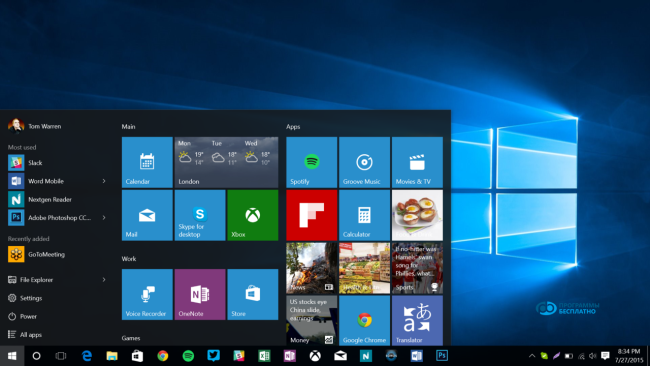
Windows 10 is an OS that has a "Start" menu. This menu is convenient to use and opens the same way as in other versions. If you wish, you can activate the "Metro interface" using the taskbar. Windows 10 has virtual desktops, which is a good advantage.
Is Windows 10 practical, is it worth switching from 8.1? If you need the "Start" menu, it is better to install "Ten". Let's emphasize: some operating systems did not have this menu, but soon the creators of Microsoft realized that it was convenient and simply necessary. Thus, the "Start" menu appeared in "Ten". The tile interface can be activated in the control panel settings.
Start has programs designed for the desktop, and they are presented in a familiar form. The window can be resized. Surely, users know that Windows 8 has the "Snap" option, which allows you to split the desktop into two parts. "Ten" has broader capabilities: it allows you to split the desktop into 4 parts. The Windows 10 operating system has virtual desktops - something new for many users.
The button called "Task View" allows you to launch applications and create desktops. This is very convenient when you have a large number of programs. Programs designed for work can be stored on one desktop, and entertainment programs on another. Windows 10 also has changes related to the interface: windows open and close beautifully.
Useful and simple manipulations in Windows 10
Let's look at useful actions that can be performed in Windows 10. A feature of the operating system is that it starts quickly: startup takes a minute. Previous versions could load for quite a long time. "Ten" can launch processes that you do not need. It will be useful to clean up the ranks. To do this, launch "Task Manager" (Ctrl + Shift + Esc), click on "More details" and switch to the "Startup" tab. The system will notify you about which programs affect the loading speed.
You can download practical offline maps. We often download maps to our smartphone when planning a long trip. If the smartphone's memory is filled with music, there is no room for maps. "Ten" has a function that allows you to save maps without internet access. To activate it, perform the following manipulations: (Win + I), click on "System", select the "Offline maps" menu.
In Windows 10, you can disable the scrolling of inactive windows. This operating system has a function for scrolling inactive windows (by default). You can disable the ability to scroll inactive windows. You need to go to settings (Win + I), go to "Devices", select "Mouse and touchpad", toggle the slider "Scroll inactive windows when hovering over them".
Should you switch to Windows 10? The choice is yours. Among many users, the question is still open. It all depends on what your wishes are regarding work. Use the OS that is most comfortable for you. Be sure to consider the range of tasks to be performed. Windows 10 is a new and more advanced system compared to Windows 8 and 7. It works solidly and efficiently.




