Nero Burning ROM - A powerful multimedia multifunctional program for high-quality work with DVD, HD DVD, CD and Blu-ray discs; video and audio. In addition, the program has backup utilities, disc cover layout, support for virtual discs. Supports DiscT@2, LabelFlash and LightScribe image application technology. There are versions of the program for recording without utilities for Linux and Microsoft Windows. Advantages: High quality burning and copying of discs
DAEMON Tools
Version 10
Description
DAEMON Tools is a virtual drive emulator program, as well as CD/DVD disc burning, that creates virtual disc drives on the computer’s hard drives using a software method, perceived by the computer as actually installed. This allows CD/DVD disc images to be used as if they were written on a physical disc by a real CD-ROM.
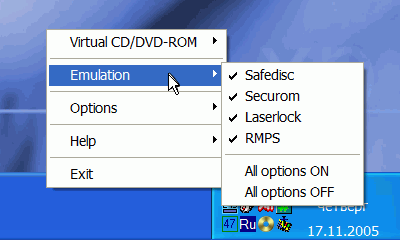
The free Russian version of DAEMON Tools also provides disc image creation in several different formats for later use by this or another similar program. Supports bypassing copy protection of StarForce, SecuROM, Laserlock, Protect CD, CDCOPS, and many others. The SCSI PassThrough Direct (SPTD) layer is used for emulation.
DAEMON Tools functionality:
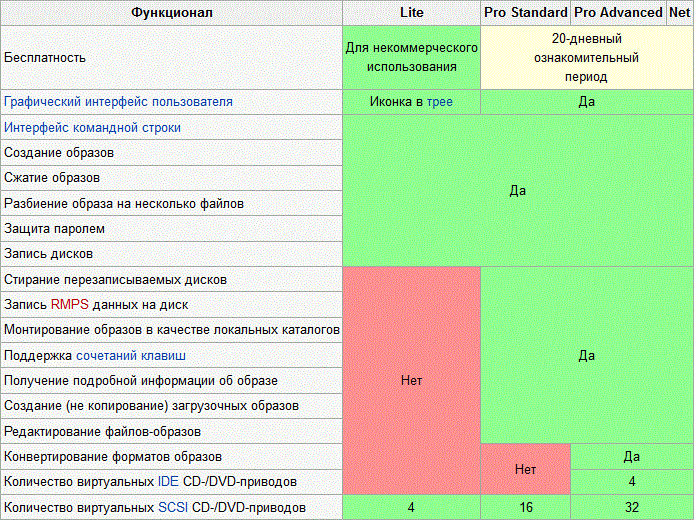
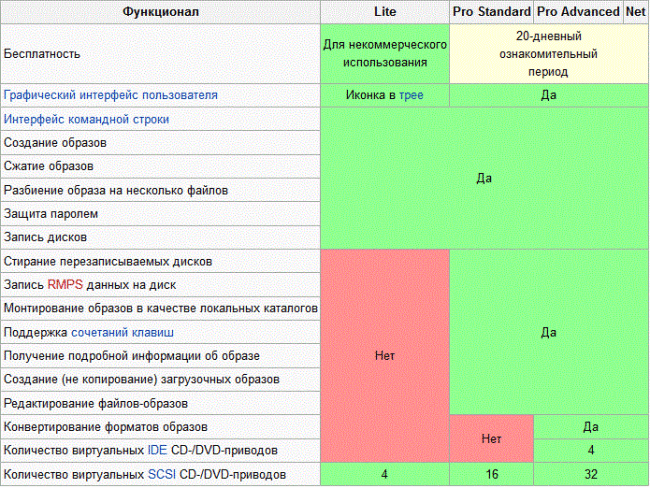
DAEMON Tools allows the creation of about 32 virtual SCSI and 4 IDE drives (IDE only in the Pro Advanced version), which are used to mount disc images. Typically, virtual drives are used to increase data transfer speeds and reduce physical wear of playback devices and storage media.
The program has a large number of specialized functions that allow interaction with various image files. This is required in a number of cases, primarily after downloading games, programs, or operating systems in image format from the internet. It is not possible to simply open such a format; it is recommended to mount it to a virtual drive.In this case, simulation of a physical drive along with autorun is achieved. Some applications, especially games, are programmed in such a way that they cannot work without a disc, even if they are already installed on the computer. DAEMON Tools bypasses this limitation.
The advantage of the application lies in the ability to interact with images differently: instead of mounting them, you can simply extract the needed file. This is achieved through real-time file processing, similar to a rar archive.
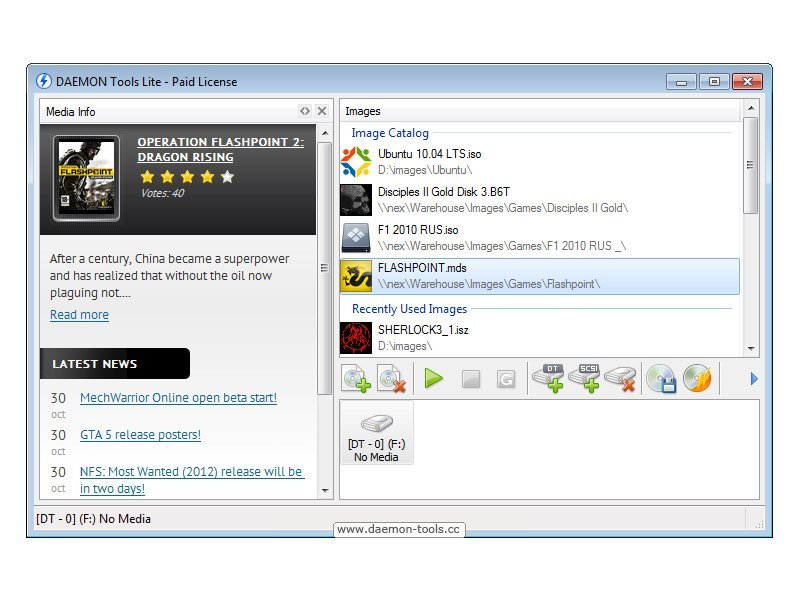
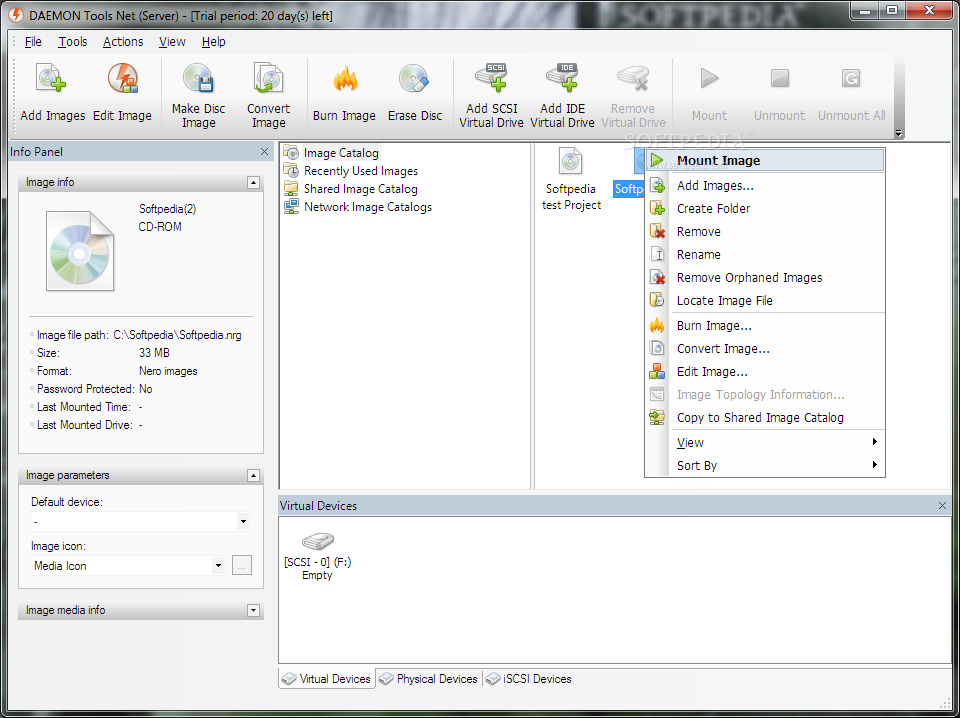
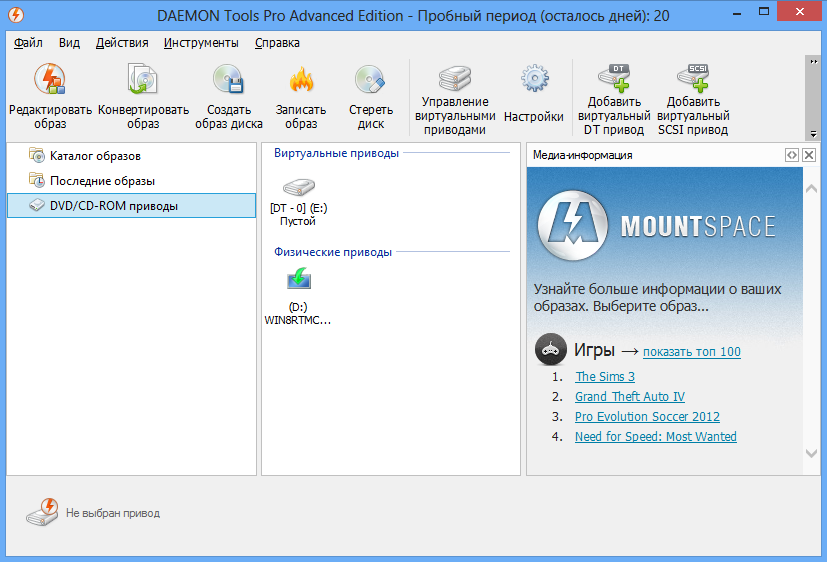
Key controls are located in the menu at the center of the program. Here you can add a new image to the application, which is done via Explorer, or conversely remove an existing image from the catalog. The button with a triangle symbol starts mounting the image to a virtual drive.
After the procedure is completed, either an autorun window will open, or a folder with files will simply open. The stop button removes the image from the drive, and the next button allows unmounting all images at once.
Program features:
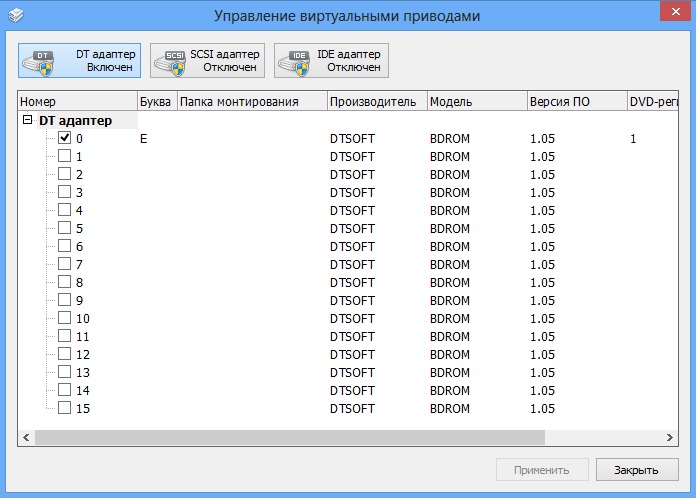
To perform device mounting, a virtual drive is first created; there are 2 options – DT and SCSI. Removal is performed by clicking on the drive icon with a red cross.
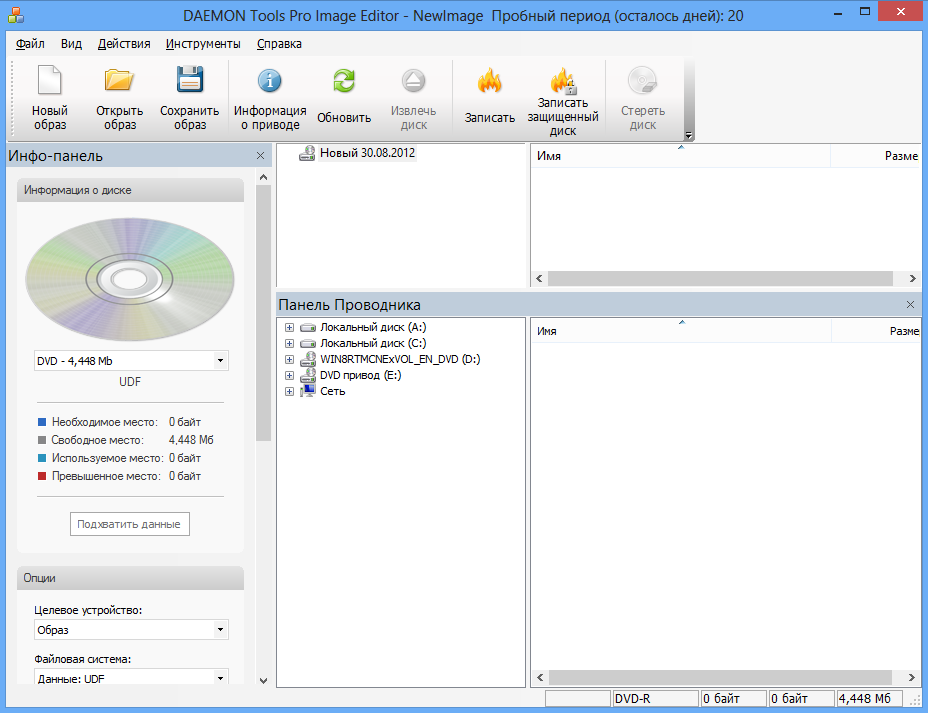
DAEMON Tools provides the ability not only to work with an image, but also to create one from a DVD or CD drive. This allows extracting even protected applications, drivers, or games from the disc.
From the application menu, you can start burning data to a disc, but this requires an additional program. If it is not installed on the system, the icon will be inactive.
The application has a minimum number of settings; in reality, there is nothing to configure here, as there are no frills. However, it is convenient to create hotkeys for mounting or other procedures.
DAEMON Tools has a Lite version – this is a free program with all necessary functions for an ordinary user. There is also a paid Pro version, which adds several auxiliary features.
DAEMON Tools supports image formats:
- nrg (Nero)
- cue/bin
- pdi (Instant CD/DVD)
- ape (Monkey’sAudio)
- cdi (Discjuggler)
- ccd (CloneCD)
- iso (ISO image)
- bwt (Blindwrite)
- flac (FLAC)
- b6t (BlindWr 6)
- b5t (BlindWr 5)
- mdx (MediaData eXt)
- mdf/mds (Media Descriptor File)
- isz (Compressed ISO images) UltraISO
Difference between DAEMON Tools builds
This table shows the difference in functionality between the Pro and Light (free version of the emulator) versions.
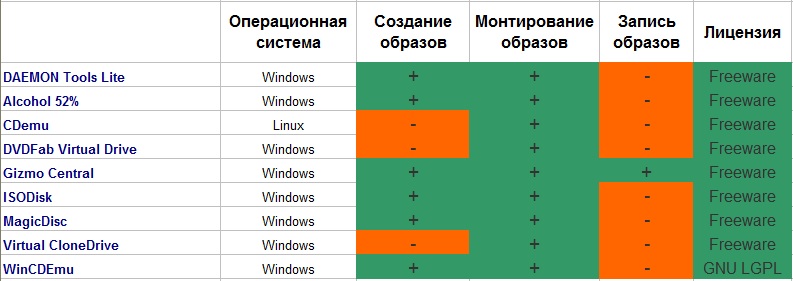
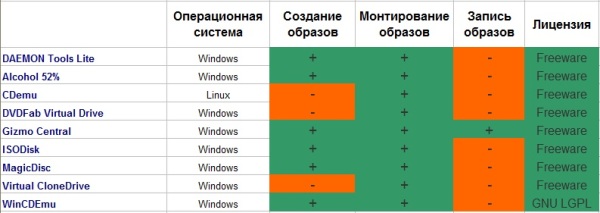
Difference between Daemon Tools Lite and other emulator programs
DAEMON Tools Ultra / Pro / MacOS download for free without registration
- DAEMON Tools Ultra 4
- DAEMON Tools Pro 7
- DAEMON Tools Net 5
- DAEMON Tools for Mac 4
- DAEMON Tools iSCSI Target 2
- DAEMON Sync
Program guide
Specifications
| Version | 10 |
| Platforms | Windows, macOS |
| Developer | Disc Soft Ltd |
| Size | 13,50 Мб |
| License | Free |
| Views | 68 409 |
Reviews
10 reviews
-
Илья 27.07.2016
Давно пользуюсь бесплатной версией, для игр и создания и записи образов вполне хватает. Для 10 мудренее, чем для 7, разбираешься во всем довольно быстро. На мой взгляд лучший симулятор образа диска!
-
Игорь 26.07.2016
Спасибо большое, наконец-то нашел рабочий DAEMON Tools. Без неё как без рук. 90% софта скачиваю в виде виртуальных дисков. Без DAEMON Tools тут просто не обойтись. Скачал и установил без проблем
-
Archy 26.07.2016
Раньше я пользовался другим софтом для создания образов, но в нужный момент его не оказалось под рукой. Я нашел Daemon Tools. Очень удобная и понятная программка. Поддерживает все необходимые мне форматы. Респект!
-
Сергей 26.07.2016
Проверенная, надежная программа. Радует широкий функционал и большое разнообразие поддерживаемых форматов образов. Ну и, разумеется, скорость работы тоже на уровне. Спасибо
-
Иван 25.07.2016
Долго искал эту программу по интернету и не мог найти для чтобы скачать быстро и с уверенностью, что будет работать, на этом сайте получилось скачать быстро и работает все без нареканий.
-
Рамиль 08.10.2015
Самая обязательная программа на компьютере, спасибо скачал быстро!
-
admin 08.07.2014
Да программа траилом, без ключей - т.е. нужно покупать ее после триала. Торрент-ссылки вряд ли будут! Сомневаюсь что они будут востребованы!
-
Анна 23.06.2014
DAEMON Tools Pro Standart 5 с триалом или без? Будут ли торрент-ссылки?
-
Андрей 29.05.2014
Скачал DAEMON Tools на высокой скорости, спасибо.
-
Olya 24.03.2014
Всегда использовала эту программу для игр, daemon tools отличная программа и ей нет равных для меня.
From this category
Show moreUltraISO - allows you to work with image files. The program itself is lightweight. It is designed for personal computer users on the Windows operating system. Note that during everyday computer use, there is often a need to work with disk images. Therefore, you have to use special software in your work. Among the variety of programs offered on the internet, give preference to the best and free option – the UltraISO program. To start using this
Small CD-Writer in Windows OS is used for burning DVD and CD discs. The application was very good in its time, but now it is not updated by developers, it has been moved to the archive, and newer, higher-quality programs have appeared. However, the program is still in demand today because it does not require installation, consisting of a single executable file. Unlike many similar programs, Small CD-Writer has a small size, works tirelessly, and does not require space for file caching. The program provides creation
Easy CD/DVD Recorder is a program that will help you perform recording as quickly, simply, and conveniently as possible. Previously a lengthy process, you can now reduce it to 3 keystrokes. Just three clicks, and the necessary data is already recorded on a CD or DVD medium. All you need to do is select the names of folders and directories, and then press the "Start" key. More experienced users can use the expert mode, which is configured through many recording parameters. Ease of use
Popular downloads
Show moreWindows Movie Maker - quickly and conveniently creates and edits videos by adding various effects. Included in Microsoft Windows, the alternative Windows Movie Maker is part of the free Windows Live software package from Microsoft. Features of Windows Movie Maker: Capture video from various sources (camcorders, mobile phones, digital video cameras, digital cameras, etc.). When creating videos in Windows Movie Maker, you can add a background audio track, use between
Starus File Recovery is a program that allows you to recover deleted data from various media. With this program, you can restore files that have been lost in various ways. For example, they were deleted bypassing the Recycle Bin, hidden by malicious software, lost due to software failures, complete emptying of the Recycle Bin, formatting, or deletion of the hard drive. The program effectively works with various devices, such as hard drives, SS
PROMT - leader in offline and online translation, with the most powerful collection of dictionaries and translated language pairs, 60 language pairs. LLC "PROMT" - a leading Russian company, developer of translation systems for private users and corporations. PROMT software provides translation of any text using built-in dictionaries, including both common and specialized terms. Instructions for any devices, in necessary software lacking a Russian interface, or emails from a foreign company
Pascal ABC.NET is written in the Delphi language (Object Pascal) on the Microsoft.NET platform. It includes the PT4 problem book, and tools for the Draftsman and Robot performers, which are used in school computer science when learning programming. The main purpose of the Pascal ABC.NET programming system is the study and teaching of modern programming languages. Features This program is a complete programming system using the Pascal language. Development takes place on the well-known platform Micros