Often, internet providers in their price lists and contracts add the prefix "up to" before specifying the speed, which gives them leeway and allows them not to provide the user with the stated speed. Therefore, the provider's promised "Up to 100 Mbps" may actually turn out to be 60 Mbps, and not always. Using online services that provide a free internet speed test.
As is known, the internet speed stated by the provider often does not match reality and differs significantly.
Moreover, the speed specified in the tariff is only the maximum, not the actual speed. Speed is affected by many things, such as a poor computer condition, a heavily loaded network, or a bad Wi-Fi (if using a router).
Internet Speed Determination Services
You can find out the actual speed using special programs and services. The most famous of them will be discussed below.
2ip Service
After going to the site, in the "Tests" tab, you need to select "Internet connection speed", then click "Testing".
This service also allows you to find out the average speed in your city and among other users of the provider.
SpeedTest Service
- https://www.speedtest.net/ru
After going to this service, you need to click the "Start" button. After a few minutes, the service will show the test results.
The site also has the option to register, after which test data can be saved in your personal account. There are also applications of this service available on Windows, Mac OS X, Android, and other platforms.
Speedtest.net allows you to check your internet speed at the moment. And if the stated speed differs greatly from the actual one, you can contact the provider with a demand to increase the speed.
So, to check the actual internet speed, you need to go to the service mentioned above. It is highly advisable to connect the device (laptop or computer) directly via a cable, not via Wi-Fi. For greater convenience, you can set the desired language and speed measurement units in the settings.
Next, you need to click the "START TEST" button (or "BEGIN TEST"):
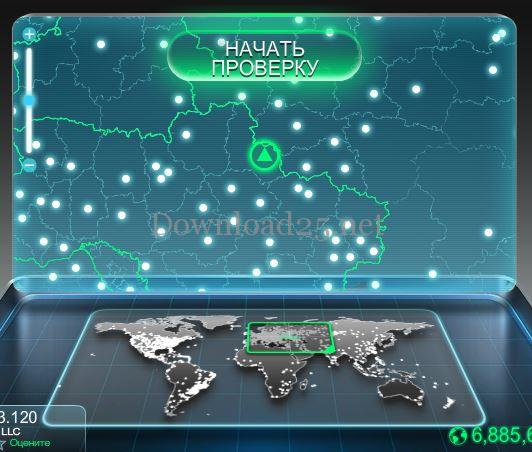
After that, the service will check the download speed and upload speed:
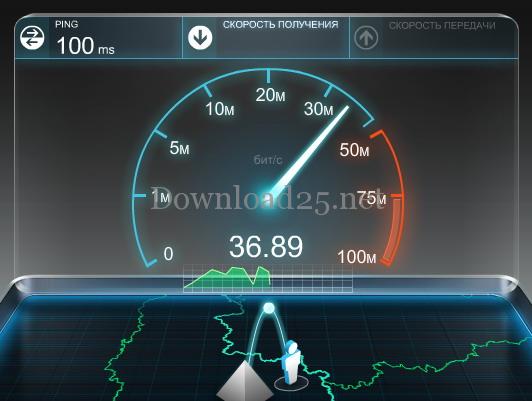
After the measurements, the program will provide an average test result:

In the settings, you can specify measurement units not in megabits, but in megabytes. You can also change the language. For example: English language and megabytes:

At the bottom of the window, there are 2 buttons:

Clicking the "Check again" button will start the internet speed test again, and clicking the second one allows you to change the server (by default, the best server is selected based on ping) and check the internet speed through another server.
Active servers are indicated by white dots (for convenience, you can use the map zoom slider) and if you hover over one of them, information about the city and provider will appear.
To select this server, simply click on it. Before checking the internet speed, you need to pause all programs that may consume internet (e.g., torrent clients).
Yandex Internetometer Service
- https://yandex.ua/internet/ru
Using this service, you can determine incoming and outgoing speed, and find out information about the OS and the browser used.
To start the test, you need to click the "Measure" button. After a few minutes, the result will be displayed on the site.
Programs for Determining Internet Speed
The disadvantage of the above internet services is that they do not allow you to monitor traffic in real time. Therefore, if the connection is not stable, the results on the site may be displayed incorrectly. Below are programs that do not have this drawback.
This program can either be installed or downloaded as a portable version and run. The program is a simple window that hangs in the corner of the screen and displays the current internet speed. It can also collect traffic information over a certain period of time.
TMeter Utility
This utility is considered more advanced; it allows you to collect information about IP addresses of various resources and protocols. It also includes a firewall and a function for distributing traffic among network users.
NetworkTrafficView Utility
Using this program, you can measure internet speed and monitor all traffic going through the network. It has an English-language interface with the possibility of Russification. No installation or configuration of the program is required.
Internet Speed Test Application
This application is designed for smartphones based on Android. With it, you can measure the speed of Wi-Fi, 2/3/4g networks, collect statistics, and share them with others. It is even available on outdated versions of the operating system.
Meteor Application
One of the most popular applications for determining speed, with a high rating in the Play Store. In addition to the ability to determine internet connection speed, it allows you to find out how quickly programs will load on this device. Only 16 applications are supported, for example: YouTube, Skype, Gmail, etc. There is no advertising in the program.
In case of problems with internet access - see articles on the topic:




