It is not uncommon for the internet to occasionally disappear, or even completely drop out. Most people immediately call technical specialists or contact their internet provider's support service, but often the problem lies in some small detail that can be easily fixed on your own!
Firstly: you need to determine the exact source of the problem. Does your internet drop out every half hour, or every hour? Perhaps the internet connects and Windows reports that everything is fine, but websites do not open?
Once you have determined exactly how your internet disappears, you should start searching for the actual source of the problem.
If your internet simply drops out every half hour or at another interval, then the problem is most likely either on the line (in the case of ADSL, etc.) or on the provider's side.
In rare cases, the problem lies in the user's computer.
In this case, we advise you to contact technical support and clarify information regarding the current issue. If everything is fine with the provider, check the telephone line; it may be damaged. If everything is fine with both the operator and your wire, then we recommend resetting your internet settings and recreating the internet connection.
If your internet connects but websites do not open, the problem may lie either in the modem settings or in the Windows settings.
There are 3 possible solutions for this type of problem:
1: Open the modem settings and try to set the Bridge mode (in the case of ADSL), or simply reset all settings to factory defaults. After that, turn off the modem, wait 10 minutes, during which time restart your computer, and then try to connect to the internet again. This solution often proves to be correct.
To access the modem settings, you need to enter the IP address of the local LAN adapter from the modem (in the case of ADSL) in your browser. Standard settings can be opened with the local machine IP address - 127.0.0.1, however, if that doesn't work, you should specify the LAN address. You can easily find out the IP address of the local LAN network.
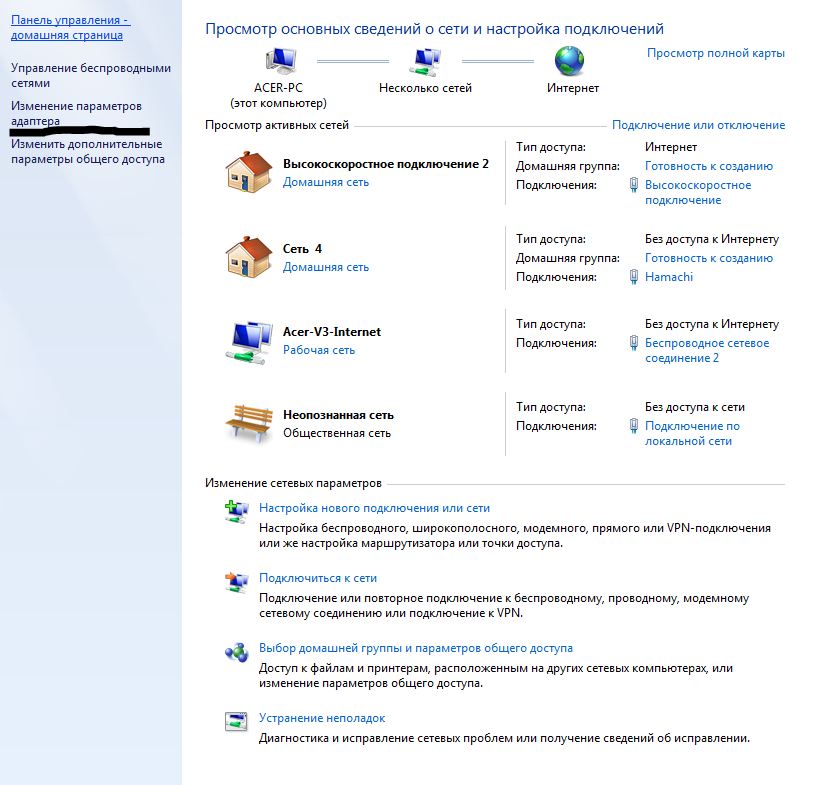
Open "Network and Sharing Center", in the left menu find the item "Change adapter settings", then find the required LAN adapter there and open its properties.
In the properties, select the item "Internet Protocol Version 4" and click the "Properties" button. You need the IP address in this window. Copy it into the browser's address bar, after which you will be taken to the modem settings page.
If the modem requests a login/password combination, enter admin/admin - this is the standard factory combination. If resetting does not help, try enabling DHCP on your modem; this is sometimes advised by technical support specialists of the internet provider.
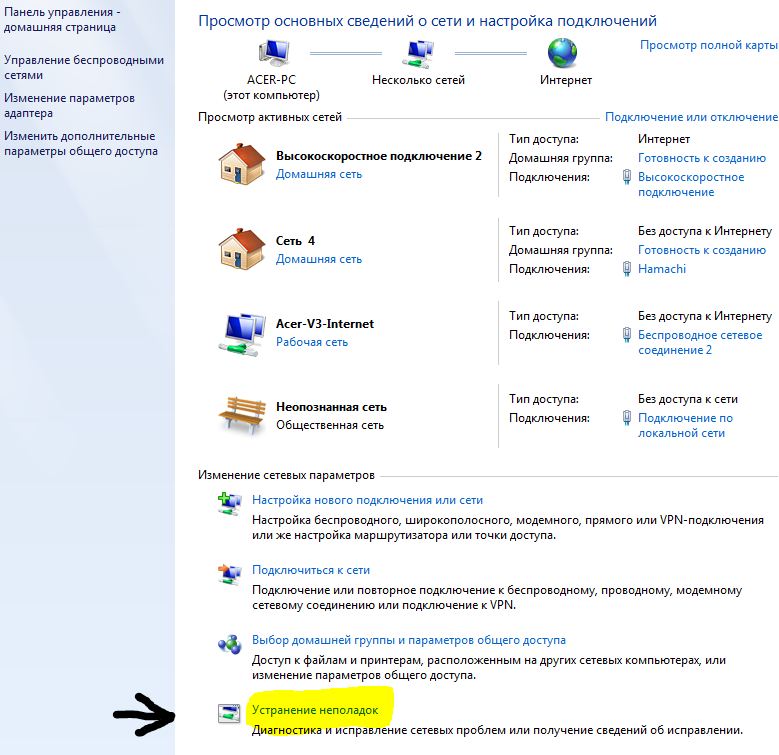
2: Possibly, Windows is currently configured incorrectly. In this case, the internet arrives from the provider but does not go from the modem to the computer. To fix this, try running the "Windows Diagnostics Troubleshooter" from the connection management center, after which Windows should automatically fix all connection problems.
To launch the setup wizard, open "Control Panel", find the "Network and Internet" tab, then open "Network and Sharing Center". At the very bottom, there will be a "Troubleshoot problems" button.
3: If none of the above methods helped, try recreating the network connection.
Video overview on the topic "why does the internet disappear"?
если на беговой дорожке есть такие вещи как блутуз и вай-фай - то вполне реально что они могут создавать помехи) Но это помехи. А если пропадает, может напряжение падает? Может еще электродвигатель создавать помехи - тут надо самому протестировать, на каком расстоянии роутер и тд. Вообщем в практике - такое не должно происходить.
Сергей18.12.2017
Здравствуйте!У меня очень интересный вопрос по поводу отключения интернета. Интернет АДСЛ, в доме есть беговая дорожка. Интернет работает стабильно до того самого момента пока не запускается двигатель на беговой дорожке. Пока он работает интернета нет.После отключения,интернет подключается. Всю голову сломал уже,так и не нашел ответ. Может кто может предположить?
Евген15.03.2017
Звонить надо провайдеру. Работаю в тех поддержке, и роутеры сами сессии обрывают(заводской брак) и порты дергаются и падают порты, и коннекторы неправильно обжаты, провода окисляются, и сессии виснут, и вай фай сети канала забиваются, dns подменяют. Всеобщем не чего веселого одна сплошная муть
Геннадий20.08.2016
Здравствуйте! Вопрос-приобрел новый настольный компьютер-сборку гарантия 2года,
после нескольких дней работы начались проблемы с интернет соединением-вся
домашняя сеть виснет,скорость интернет-соединения как проводная так и воздушная падает практически до нуля.через какое-то время(бывает несколько дней) все восстанавливается до нормального состояния до следующего зависания-пробовал подключаться вне дома-та-же проблема-отправил в ремонт по гарантии,там переустановили винду ,но проблема осталась-не думаю что за пару дней сумел подцепить что-то вредоностное,что без моего ведома использует моё интернет соединение Очень надеюсь на Вашу помощь-Геннадий
Yandex Browser29.07.2016
Я так понимаю, что интернет-подклю чение на компьютер все же работает, но пропадает с разной периодичностью. Попробуйте подключить интернет напрямую, без роутера. Если проблема останется, нужно попробовать переустановить драйвера сетевой карты или поменять ее вовсе. Если проблема исчезнет, то сбрасывайте настройки роутера и настраивайте его заново в соответствии с инструкциями провайдера.
Ammyy Admin25.07.2016
а у меня пропадает интернет то есть я включаю комп работает где то 5 мин и пропадает , перезагружаю опят тоже самой 5-6 мин работает и снова пропадает с чем это связано может быть?
MyPublicWiFi15.07.2016
Я так понимаю, что интернет-подклю чение на компьютер все же работает, но пропадает с разной периодичностью. Попробуйте подключить интернет напрямую, без роутера. Если проблема останется, нужно попробовать переустановить драйвера сетевой карты или поменять ее вовсе. Если проблема исчезнет, то сбрасывайте настройки роутера и настраивайте его заново в соответствии с инструкциями провайдера.
Papas15.01.2016
Пожалуйста поясните, Екатерина, связь с интернетом пропадает только на втором компьютере или на обеих машинах одновременно? Когда пропадает интернет, горит ли индикатор связи с компьютерами на маршрутизаторе?
Калистра Силвер11.01.2015
Не помогает. Потому что у меня Windows 8 на ноутбуке. Помогите, в этом случае. Если я близко к источнику интернета. Дайте ссылку как это исправить.
Tanya03.01.2015
"В редких случаях проблема кроется в компьютере пользователя."
К несчастью у меня это именно тот случай, на модете висит 3 других нота а проблема только у десктопа. Пинг волновой, от полной потери пакетов и невозможности найти удаленку до 100% работы и волна от 5 мин до часа. Я сдала комп в сервис сделать клон системы и установить его на новый харддрайф а получила обратно такое. ж( Есть идеи что это может быть?
Заранее спасибо
Windows Movie Maker - quickly and conveniently creates and edits videos by adding various effects. Included in Microsoft Windows, the alternative Windows Movie Maker is part of the free Windows Live software package from Microsoft. Features of Windows Movie Maker: Capture video from various sources (camcorders, mobile phones, digital video cameras, digital cameras, etc.). When creating videos in Windows Movie Maker, you can add a background audio track, use between
Starus File Recovery is a program that allows you to recover deleted data from various media. With this program, you can restore files that have been lost in various ways. For example, they were deleted bypassing the Recycle Bin, hidden by malicious software, lost due to software failures, complete emptying of the Recycle Bin, formatting, or deletion of the hard drive. The program effectively works with various devices, such as hard drives, SS
PROMT - leader in offline and online translation, with the most powerful collection of dictionaries and translated language pairs, 60 language pairs. LLC "PROMT" - a leading Russian company, developer of translation systems for private users and corporations. PROMT software provides translation of any text using built-in dictionaries, including both common and specialized terms. Instructions for any devices, in necessary software lacking a Russian interface, or emails from a foreign company
Pascal ABC.NET is written in the Delphi language (Object Pascal) on the Microsoft.NET platform. It includes the PT4 problem book, and tools for the Draftsman and Robot performers, which are used in school computer science when learning programming. The main purpose of the Pascal ABC.NET programming system is the study and teaching of modern programming languages. Features This program is a complete programming system using the Pascal language. Development takes place on the well-known platform Micros