Windows Movie Maker - quickly and conveniently creates and edits videos by adding various effects. Included in Microsoft Windows, the alternative Windows Movie Maker is part of the free Windows Live software package from Microsoft. Features of Windows Movie Maker: Capture video from various sources (camcorders, mobile phones, digital video cameras, digital cameras, etc.). When creating videos in Windows Movie Maker, you can add a background audio track, use between
Opera Plugin Settings
Description
Probably, most Opera users wonder about the settings of this browser, particularly when it comes to new browser versions. Today we will talk about how to configure plugins in the Opera browser. Let's start with the definition of "Plugin".
A plugin is an auxiliary browser component that extends its functionality and allows many elements on web pages to work. For example, Adobe Reader, which reads online .PDF files, is a plugin because it is an auxiliary tool. Java(TM) is also a plugin, as it is an auxiliary tool and enables JAVA applications to run on web pages.
One of the most popular plugins is probably Adobe Flash Player, which allows Flash elements to be played on websites. For example, it enables video players on sites like YouTube, and also allows playing online games on the Facebook social network that are made with Flash.
It's impossible to imagine the Internet as we see it today without plugins! As everyone knows, Opera supports Netscape plugins, all except Live Connect, which allows languages to communicate with each other.
Typically, a Netscape-compatible plugin is essentially a dynamic-link library, namely .DLL. Plugins are located in the standard \opera\plugin folder or in the Netscape plugins folder if they are installed under Netscape.
For example, if you look at the Adobe Reader plugin, you can see that it is also a dynamic-link library:
[caption id="attachment_1157" align="aligncenter" width="600"]
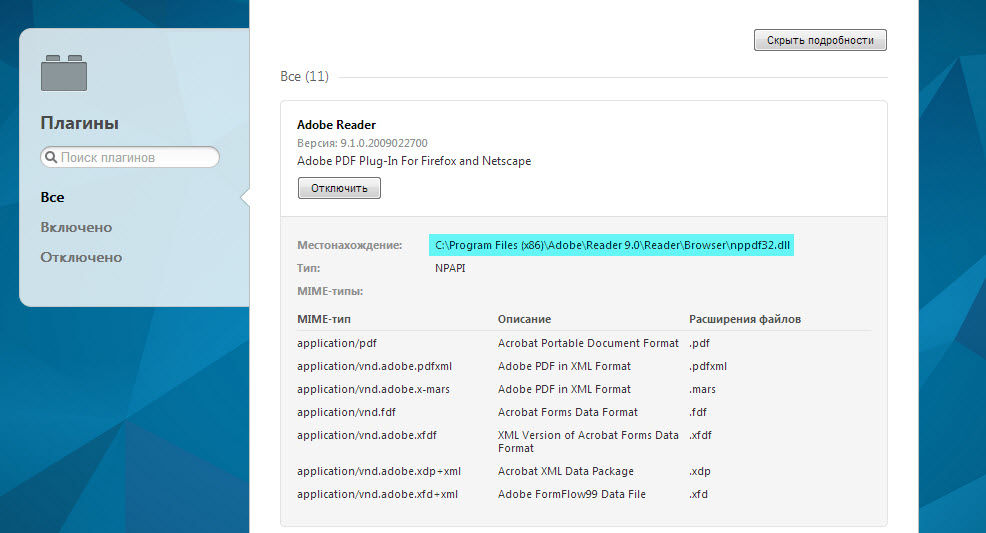
Opera plugin settings[/caption]
By the way, you can access the Opera browser plugins panel by typing the following address in the address bar: opera://plugins
Sometimes the plugin installer asks for the Netscape browser folder, and you try to install it in Opera, but it won't install because it cannot find the netscape.exe file. To avoid this, simply create any .txt file and rename it to netscape.exe, then move it to the Opera root folder. Now the plugin will think Netscape is located here and will install properly.
If something doesn't work, you can simply take the plugin from the Netscape plugins library and copy it to the Opera plugins folder. Typically, plugins have a format like np***.dll, indicating browser purpose or functional purpose. However, DLL files usually contain a description of the plugins and their installation method.
In that case, it is enough to copy the specified files to the Opera plugins folder, then find them using Find Plugins and enable them. However, the standard Opera plugin set contains all the necessary plugins, and they are enabled by default.
Additional plugins can be found on the official Opera browser website.
Good luck!
Specifications
| Size | |
| License | Freeware |
| Views | 48 009 |
Reviews
5 reviews
-
Александр 04.07.2017
Проблема в том, что вкладка «Плагины» в Opera 46 отсутствует, перечень плагинов невозможно вызвать ни через opera://plugins, ни через about:plugins. Вот об этих кознях творцов браузера нужно писать, а не о дилетантских пустяках, которые мало кому интересны. Как добраться до плагинов?
-
Finwall 25.04.2017
Веб-страница по адресу opera://plugins/, возможно, временно недоступна или постоянно перемещена по новому адресу.
-
Сергей 24.12.2015
Ужасная версия,требует обновить ADOBE плейер, но при этом не обновляется.Старая версия работает нормально.
-
Валерий 27.04.2015
Очень неудобно: нет панели главного меню, трудно добраться до настроек плагинов. Очень скромные возможности более тонкой настройки. Программа для домохозяек, которые умеют только нажимать кнопки и совершенно ни о чём не думать. Пользоваться не буду. (Very inconveniently: there is no main menu panel, it is difficult to reach options of plug-ins. Very modest possibilities of more granular control. The program for housewives which are able to press only buttons and it is perfect of what not to think. I will not use.)
-
adilet 27.12.2014
как??
Popular downloads
Show moreStarus File Recovery is a program that allows you to recover deleted data from various media. With this program, you can restore files that have been lost in various ways. For example, they were deleted bypassing the Recycle Bin, hidden by malicious software, lost due to software failures, complete emptying of the Recycle Bin, formatting, or deletion of the hard drive. The program effectively works with various devices, such as hard drives, SS
PROMT - leader in offline and online translation, with the most powerful collection of dictionaries and translated language pairs, 60 language pairs. LLC "PROMT" - a leading Russian company, developer of translation systems for private users and corporations. PROMT software provides translation of any text using built-in dictionaries, including both common and specialized terms. Instructions for any devices, in necessary software lacking a Russian interface, or emails from a foreign company
Pascal ABC.NET is written in the Delphi language (Object Pascal) on the Microsoft.NET platform. It includes the PT4 problem book, and tools for the Draftsman and Robot performers, which are used in school computer science when learning programming. The main purpose of the Pascal ABC.NET programming system is the study and teaching of modern programming languages. Features This program is a complete programming system using the Pascal language. Development takes place on the well-known platform Micros



