Windows Movie Maker - quickly and conveniently creates and edits videos by adding various effects. Included in Microsoft Windows, the alternative Windows Movie Maker is part of the free Windows Live software package from Microsoft. Features of Windows Movie Maker: Capture video from various sources (camcorders, mobile phones, digital video cameras, digital cameras, etc.). When creating videos in Windows Movie Maker, you can add a background audio track, use between
Windows does not see the hard drive
Description
A fairly common problem - related to the fact that the computer does not see the HDD (hard drive), is solved very simply.
Firstly: you should check the cable connections that connect the hard drive to the motherboard; if you have a laptop, you do not need to check the cables :).
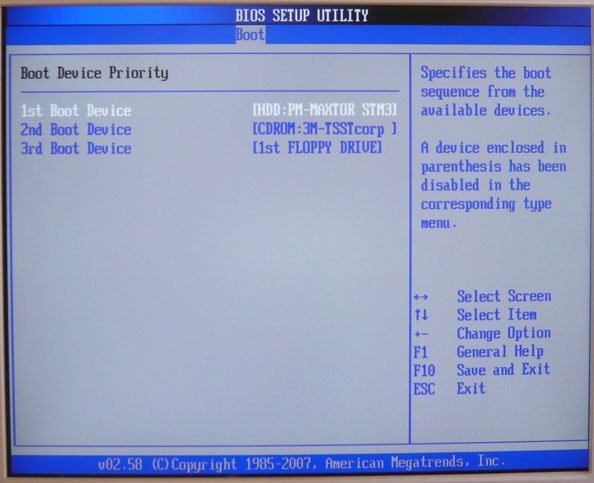
Secondly: a very common solution to this problem is to set the HDD (hard drive) as the first priority in the BIOS boot order. During BIOS boot, press the "DEL" key to enter the BIOS settings. Go to the "BIOS" tab, and then to the "BOOT Priority" tab, and there set your HDD as the first priority.
Press the F10 key -> save the settings and restart your computer: Windows should start.
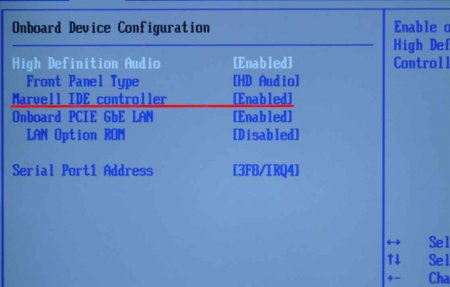
Additionally, you should check if your controller is enabled. If your hard drive interface is "IDE", be sure to enable "Marvell IDE controller" in the BIOS settings; your controller may have a different name. If that doesn't help, try connecting the hard drive cable to a different slot. 
None of the methods help and Windows does not see the hard drive?
In that case, we advise you to contact a professional, as the problem may be a malfunction of the HDD itself. If you are well-versed in such matters yourself, we advise you to check the jumper settings, which should be set correctly, so that the BIOS displays the HDD and Windows boots.
You might be interested in programs on the site:
Specifications
| Size | |
| License | Freeware |
| Views | 8 604 |
Reviews
11 reviews
-
Данил 04.08.2016
Была такая проблема пару раз, всегда помогали знакомые, так как сам не очень разбираюсь. После прочтения этой статьи в следующий раз сам попробую все исправить. Спасибо за полезную информацию.
-
Ольга 28.07.2016
У меня как раз была такая проблема. Причем я на нескольких сайтах искала ответы, но так и не смогла понять, что же нужно сделать. А в этой статье все предельно ясно написано. Спасибо.
-
Сергей 26.07.2016
Вот это выручили, спасибо большое! Я уже и не знал. что делать. Все соединения на месте, решил уже всё, жесткий диск своё отслужил. А оказалось вполне легко решаемая проблема, благодаря вашей инструкции
-
Максим 26.07.2016
Была проблема с жестким диском, думал все, сломался, а как оказалось, просто пришлось открыть BIOS и поставить загрузчик с жесткого диска на первое место.Спасибо вашему сайту за полезную информацию.
-
Максим1993 26.07.2016
Спасибо, что есть скрины, чтобы наглядно всё увидеть. Всё понятно написал автор. У меня было такое, что на жестком нужно кабеля подергать и решалась проблема с дисководом, дисковод не видел комп.
-
Алексей Рязанцев 26.07.2016
Спасибо, помогло. Зашел в Биос, а там жесткий диск почему-то вообще не показывает для загрузки. Поставил его на первое место, сохранил данные настройки и все отлично сразу же заработало.
-
Лилия 09.12.2015
Хорошая инструкция. Но как правило, если система не видит HDD, то это означает, что , скорее всего, он попросту вышел из строя и его не вернуть. Конечно, попытаться привести в чувства винчестер можно, но если с его механикой произошел сбой или сгорел контроллер, то это уже все.
-
Олег 08.12.2015
Хорошо что написали про Bios, а то про такие разделы мало кто знает, а тут получил информацию и сам исправил, и не надо искать специалиста. Спасибо вам.
-
Миха 08.12.2015
Спасибо за статью, а также за фото, по счастью, у меня оказался такой же BIOS и я с легкостью решил проблему
-
Иван 08.12.2015
Как же долго я мучился над этой проблемой. Вы просто спасли меня. Спасибо огромное!
-
Екатерина 08.12.2015
Огромное спасибо! Благодаря вашему сайту я смогла разобраться в неисправность компьютера.
Popular downloads
Show moreStarus File Recovery is a program that allows you to recover deleted data from various media. With this program, you can restore files that have been lost in various ways. For example, they were deleted bypassing the Recycle Bin, hidden by malicious software, lost due to software failures, complete emptying of the Recycle Bin, formatting, or deletion of the hard drive. The program effectively works with various devices, such as hard drives, SS
PROMT - leader in offline and online translation, with the most powerful collection of dictionaries and translated language pairs, 60 language pairs. LLC "PROMT" - a leading Russian company, developer of translation systems for private users and corporations. PROMT software provides translation of any text using built-in dictionaries, including both common and specialized terms. Instructions for any devices, in necessary software lacking a Russian interface, or emails from a foreign company
Pascal ABC.NET is written in the Delphi language (Object Pascal) on the Microsoft.NET platform. It includes the PT4 problem book, and tools for the Draftsman and Robot performers, which are used in school computer science when learning programming. The main purpose of the Pascal ABC.NET programming system is the study and teaching of modern programming languages. Features This program is a complete programming system using the Pascal language. Development takes place on the well-known platform Micros



