Windows XP won't load
PC Setup Free

Windows XP won't load

4.7 (3 ratings) Hover and click a star to rate
Downloads
0
Size
Rating
4.7 / 5
License
Freeware

Description

It is not uncommon for users to experience that the Windows XP operating system does not boot. As a rule, this happens for no apparent reason, since the OS was loading normally recently, and then problems suddenly arose.

There can be many reasons for this, and there are a number of the most common causes why the OS stops loading. Also, you should pay attention to how exactly the OS does not load—whether it does not load at all or stops loading after the Windows XP logo with a progress bar appears.

If the operating system does not load at all (the XP logo does not appear), there may be 3 likely sources of the problem.

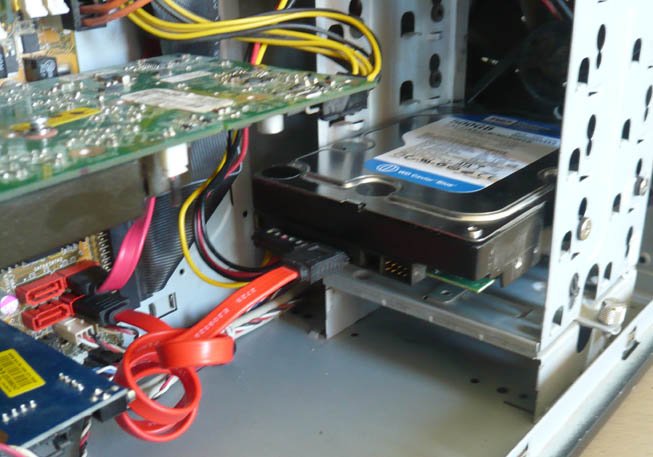
Firstly: you should check how well the HDD is connected to the motherboard, since it is not uncommon for the operating system to stop loading because the computer simply does not see the HDD. In this case, it is enough to simply adjust the HDD connection to the motherboard.

[caption id="attachment_2600" align="aligncenter" width="550"]Connecting HDD to the motherboard Connecting HDD to the motherboard[/caption]
Secondly: you should make sure that the HDD has no defects. You can check the HDD for bad sectors using special programs that load from the BIOS. One such program is called Victoria, it allows you to check the HDD for bad sectors from the BIOS. If the HDD has bad sectors, we recommend replacing it, and to recover old data, contact a professional.

Thirdly: the problem may be in the OS being defective. Most often, the OS is damaged due to viruses. To fix this problem, try reinstalling the OS. If you cannot reinstall the operating system, refer to the points described above. Also, if the problem cannot be identified, we recommend contacting a professional for help—they will quickly determine the source of the problem and fix it.

If the operating system loads (the XP logo with a progress bar appears), there may be 2 likely problems.

Firstly: the problem may lie in defects in the computer. In this case, you should thoroughly check the connections of all possible devices to the motherboard.

Secondly: the most common problem in this case is a defective OS. This means that the operating system is damaged and therefore cannot boot. This problem was most likely initiated by a virus. In this case, there are 2 possible solutions: try to restore the system or reinstall the OS.

The second option is more suitable, since even after system restoration, viruses may remain in the system and cause damage again. The best solution in such cases is to contact a professional who is well-versed in such matters and will help you resolve the problem as quickly as possible.

You may be interested in programs on the site:

Good luck in restoring the functionality of Windows XP!

Specifications

Size
LicenseFreeware
Views11 384

Reviews

2 reviews

  • oleg 25.11.2015

    Добрый день! Подскажите, Работал на компьютере XP, все было нормально, попросил он перегрузиться. Я перегрузил, Как только начинается загрузка все вроде нормально как обычно, как только доходит до того когда должен появиться логотип XP он больше ни на что не реагирует , экран темный, клавиатура с мышкой не реагируют. Подскажите что может быть, в чем причина.

  • роман 30.11.2014

    Здравствуйте у меня токая проблема устонавливаю виндовс хр у соседа все работает прихожу дамой дискавод тотже устанавливаю после перезагрузки начинает грузить и выкидует!!!!!!!!! Подскажите что делать

Popular downloads

Show more
Windows Movie Maker

Windows Movie Maker

Video Editors
3.9

Windows Movie Maker - quickly and conveniently creates and edits videos by adding various effects. Included in Microsoft Windows, the alternative Windows Movie Maker is part of the free Windows Live software package from Microsoft. Features of Windows Movie Maker: Capture video from various sources (camcorders, mobile phones, digital video cameras, digital cameras, etc.). When creating videos in Windows Movie Maker, you can add a background audio track, use between

1 061 824 7.02 Мб
Download
Starus File Recovery

Starus File Recovery

Recovery Programs
5.0

Starus File Recovery is a program that allows you to recover deleted data from various media. With this program, you can restore files that have been lost in various ways. For example, they were deleted bypassing the Recycle Bin, hidden by malicious software, lost due to software failures, complete emptying of the Recycle Bin, formatting, or deletion of the hard drive. The program effectively works with various devices, such as hard drives, SS

190 009 14.08 Мб
Download
PROMT

PROMT

English to Russian translators
3.3

PROMT - leader in offline and online translation, with the most powerful collection of dictionaries and translated language pairs, 60 language pairs. LLC "PROMT" - a leading Russian company, developer of translation systems for private users and corporations. PROMT software provides translation of any text using built-in dictionaries, including both common and specialized terms. Instructions for any devices, in necessary software lacking a Russian interface, or emails from a foreign company

46 864 794.00 Мб
Download
Pascal ABC

Pascal ABC

Programming
4.1

Pascal ABC.NET is written in the Delphi language (Object Pascal) on the Microsoft.NET platform. It includes the PT4 problem book, and tools for the Draftsman and Robot performers, which are used in school computer science when learning programming. The main purpose of the Pascal ABC.NET programming system is the study and teaching of modern programming languages. Features This program is a complete programming system using the Pascal language. Development takes place on the well-known platform Micros

41 458 67.70 Мб
Download