As is known, video or audio files take up a large amount of memory on the hard drive, which accordingly causes some inconvenience. For example, transferring a large file over a network can be an extremely difficult task, since it takes a lot of time to transfer large files.
Also, storing many such files on a computer is not possible, since disk space is not infinite.
To solve this problem, information encoding technology was invented for the purpose of compression. To be more precise, multimedia file compression technology was invented, and this technology was called "Encoding/Decoding". Abbreviated as "Codec".
Naturally, there are many codecs, and accordingly, each of them differs in quality and compression strength of video/audio, etc. It is not uncommon for players, such as KMPlayer, to integrate the most popular codecs to avoid the problem of decoding encoded information.
Probably everyone has encountered the problem where video does not play, or only audio plays. This problem is caused by the video being encoded with one method and the audio with another. If nothing plays at all, it means your system does not know how to decode either the audio or the video.
Popular players like GOM Player report which codec is missing and offer to download and install it. However, to avoid spending a lot of time searching and installing, it is best to download and install a pack of the most popular codecs. As a rule, the main set of codecs is provided by the program K-Lite Mega Codec Pack. There is also SAM Codec Pack.
The most popular codecs are usually installed, namely:
- MPEG-1
- MPEG-2
- MPEG-4
- RM
- RV
- WMV
- DivX
- AVI
- Cinepak
- H.261
- H.263
- H.264
- Indeo
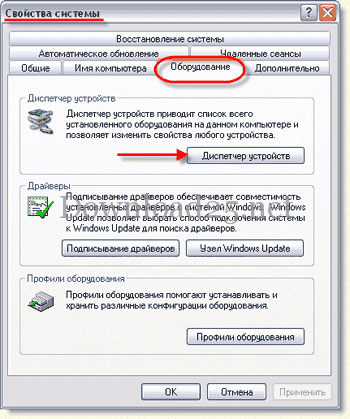
It is very easy to see which codecs are installed on your system. To do this, right-click on the "My Computer" shortcut, usually located on the desktop, and then open the computer properties. In the computer properties, go to the "Hardware" tab and open "Device Manager".
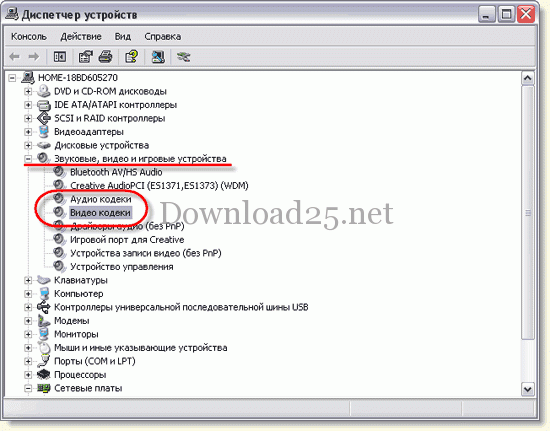
In the Device Manager, find the option "Sound, video and game controllers" and open it. In the list that appears, you will find the Audio/Video codecs items.
To see the list of codecs, open the properties of one or another item.
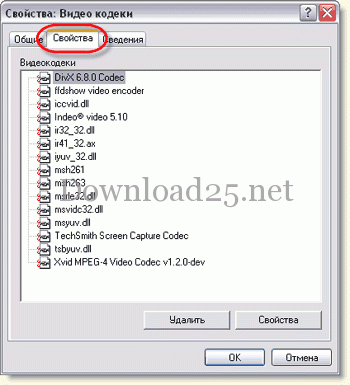
Also, to see the list of codecs, you can use the CodecInstaller utility, which will automatically show the list of codecs and allow you to work with them.