Social networks - absolutely everyone who uses the Internet uses them, just as the phone once gained incredible popularity - today social networks enjoy incredible universal popularity.
Perhaps in the near future, every inhabitant of the Earth will have their own account in one social network or another. As a rule, it is impossible or quite difficult to delete an account in social networks; it still remains in the system, no matter what you do.
The Social Network Drug Vokrug is no exception - it also does not have the ability to delete an account. What to do in this case?
There are 3 Options to delete an account in the Social Network Drug Vokrug
So far, there are only 3 truly effective methods to delete yourself from DrugVokrug. Let's talk about these methods in more detail.
1st option: You can delete your account in the program settings
For almost 2 years, people have been looking for a way to delete their account in the social network Drug Vokrug using various options, but the most popular were the 2nd and 3rd options. But just recently, the developers of DRUG VOKRUG introduced the ability to delete an account into the program, now I will describe in detail with screenshots how to correctly delete an account!
Find the "SETTINGS" button in the program, click on it...
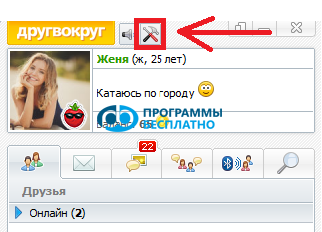
Next, we enter the "SETTINGS" menu, at the very bottom the developers of DRUG VOKRUG have placed a link "Delete Profile", if you have really decided to delete your profile - click ;)
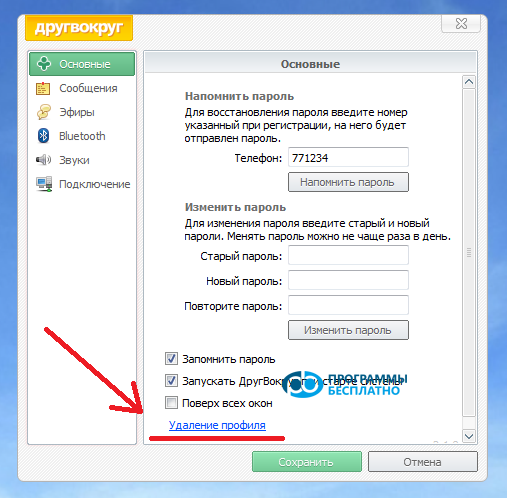
After you click on the "Delete Profile" link - a confirmation dialog box will appear, maybe you changed your mind? ;)
If you haven't changed your mind, click the "DELETE" button and after that your profile will be blocked and will await deletion within a month.
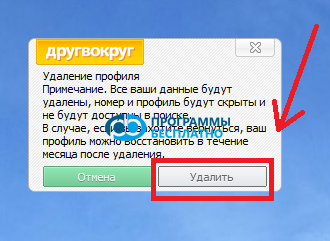
Remember, within a month - you can restore your profile back; if you do not restore your profile within a month - it will be deleted forever!
2nd option: Administration
The first and perhaps fastest method is to write a message to the DrugVokrug administration, asking them to delete your account, after which accounts are most often deleted from the social network Drug Vokrug. To do this, find the contact "Drug Vokrug" among your friends and write them an appropriate letter, in which it is advisable to state the reason for deleting the account.
You should write without errors and correctly, otherwise the administration may refuse you.
If you did everything correctly - the Drug Vokrug administration will delete your account. In some cases, this does not work, so let's move on to the second option.
3rd option: Cover your tracks
Perhaps DrugVokrug does not have an account deletion option, but there is the ability to change your name, avatar, and much more. The second method involves changing your name to some "Abracadabra", changing your avatar, and completely clearing your friends list. This way, you will spoil your account, delete all friends - making yourself an inactive user. You could say that you have effectively deleted yourself from the Social Network DrugVokrug.
Delete all friends, open your profile (click on your nickname) and replace your information and nickname with a dot or space, upload a picture instead of a photo. Delete the application from your computer.
For those who ended up on this page completely by accident and want to register, then first you need to read the description of the Social Network Drug Vokrug and then download Drug Vokrug for computer.