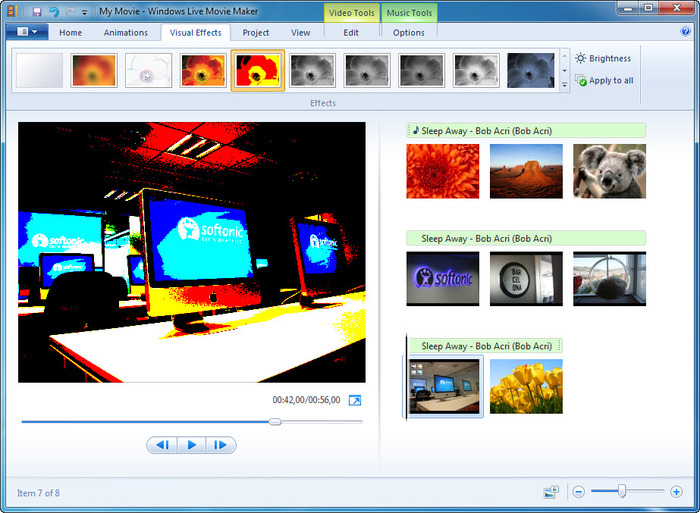
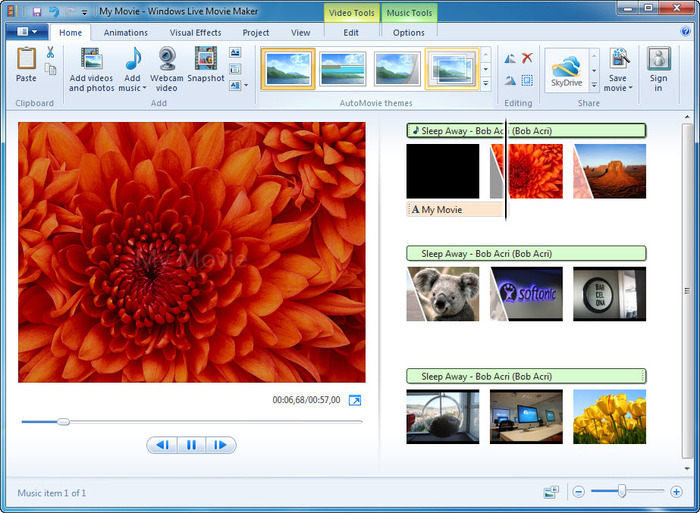
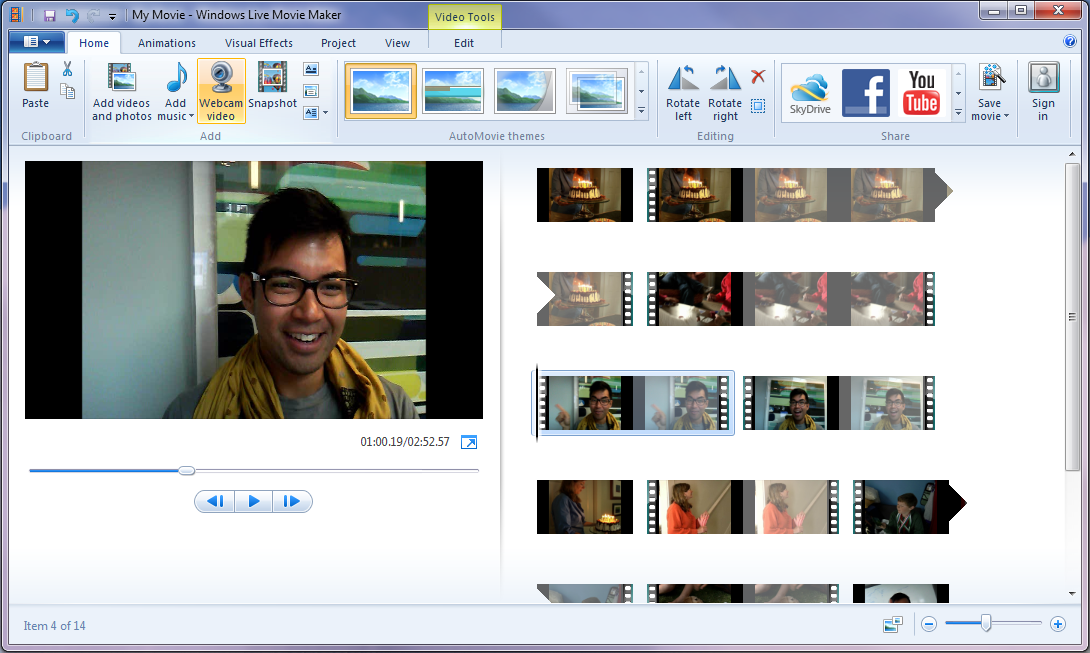
Windows Movie Maker - quickly and conveniently creates and edits videos by adding various effects. Included in Microsoft Windows, the alternative Windows Movie Maker is part of the free Windows Live software package from Microsoft. Features of Windows Movie Maker: Capture video from various sources (camcorders, mobile phones, digital video cameras, digital cameras, etc.). When creating videos in Windows Movie Maker, you can add a background audio track, use between
Windows Live Movie Maker
Version 16.4
Description
Windows Live Movie Maker is a functional, free, and powerful tool (Windows Live - Movie Studio) from Microsoft, designed for creating movies and impressive video clips from photos and videos. You can add transitions, colorful effects, record audio tracks, titles, and more.
Program Features
Created projects can be sent via email, saved to optical media, recorded as high-resolution video for PCs, various mobile devices (Zune, Windows Phone), and published online (YouTube, SkyDrive, Flickr, Facebook, etc.). The program's integration with social networks enables sharing videos online with family and friends.
Windows Live Movie Maker is completely free with an intuitive interface and is designed for the average user. It includes all the necessary tools for creating various effects, video transitions, and audio editing. Videos created in the program can be easily sent via email.
The program has many capabilities. With Windows Live Movie Maker, you can create high-quality title captions, slideshows, cut, edit, process, and convert video, add simple animation effects, transitions, and adjust time intervals.
There is an option to save the movie to a camcorder and adjust the quality of the created movie. The project can be saved in formats such as AVI and WMV.
Advantages and Disadvantages of the Program
The program features an intuitive, modern interface design, making it easy for beginners to learn. It supports the most common video file extensions. The program is equipped with its own library of video effects. It has a function for saving video images and photos.
Additionally, the program can be used to create vibrant presentations from photos, add effects, voiceovers, and music. Special effects and animation transitions can be previewed. The modern Windows Media compression technology helps maintain good image and sound quality.
Advantage
The program is easy to use, but it has a few drawbacks. It has limited editing capabilities for imported video files and supports a small number of video extensions.
The program cannot cut specific parts of a video. It is an excellent tool for creating both amateur and highly professional videos.
Supported formats: JPEG, TIFF, GIF, Windows Media Video (WMV), Windows Media DV-AVI, Microsoft Recorded TV Show, 3GP, 3GPP, MPEG2, MPEG1, Motion JPEG, Bitmap, PNG, Quick Time .mov, .qt, AVCHD, MPEG4.
Main Features of Windows Live Movie Maker:
- Ability to add effects, text, audio, transitions, etc.
- Edit video/audio.
- Import video and photos from a camera directly into the program.
- Features a Ribbon interface.
- Preview special effects and animation transitions.
- Publish videos on social services and video sharing sites.
- Auto-compose a video file from media content.
- Record video in high definition (480, 720, 1080p).
- Set of editing tools: special effects, audio file fragments, music mixing, cutting unwanted parts, slowing down and speeding up the movie, splitting into parts, artistic effects, adding titles and captions.
- Integration with Windows Live Photo Gallery.
Note!!! The Windows Live Movie Maker program is part of the Windows Live package and is presented as a unique web installer. During installation, you need to select the desired components. To download Windows Live Movie Maker, go to the "Choose programs to install" section in the web installer panel, then check only "Photo Gallery and Movie Studio".
Attention: The Windows Live Movie Maker program is not compatible with Microsoft Windows operating systems released before Windows Vista.
Specifications
| Version | 16.4 |
| Platforms | Windows |
| Developer | Microsoft Corporation |
| Size | 217 Mб |
| License | Free |
| Views | 13 319 |
Reviews
2 reviews
-
Alex 12.11.2018
Перепробовал целую кучу различных фоторедакторов, но... вернулся именно к этому и не изменяю ему с 2012 года...)
-
Мультик 09.12.2015
Самый простой и удобный видеоредактор
From this category
Show moreAdobe Premiere Pro CS6 - not so long ago, the well-known corporation Adobe delighted its many users with the release of a new updated version of the service designed for editing video format files. You can download Adobe Premiere CS6 for free right here, on our website. Having started the installation of the full package of services, you will, as usual, see in the installation window a list of all programs already automatically ready for installation. The list is quite large, each application is designed for different
Movavi Video Editor serves as a tool for working with video files. The application provides professional filters, adding subtitles to clips, various transition effects, special effects ("mosaic", "sepia", "picture-in-picture", "add noise", "grayscale", etc.), overlaying custom audio tracks, changing playback speed for audio/video files, and much more. Features During the import of media files into the project, there is an option to capture audio and video, including from VHS video recorders.
VirtualDubMOD, an enhanced version of the well-known program VirtualDub, is used for video processing and capture. Joining, cutting clips, applying filters, transcoding, etc. The authors have not been involved in development since 2006. The program interface is similar to VirtualDub, with a significant difference being that the Audio menu has been replaced by Streams, reflecting the processing of multiple audio streams. A feature of the program is its work with a huge number of media file formats. VirtualDubMod, unlike VirtualDub, opens both AVI and MPEG1 f
Popular downloads
Show moreStarus File Recovery is a program that allows you to recover deleted data from various media. With this program, you can restore files that have been lost in various ways. For example, they were deleted bypassing the Recycle Bin, hidden by malicious software, lost due to software failures, complete emptying of the Recycle Bin, formatting, or deletion of the hard drive. The program effectively works with various devices, such as hard drives, SS
PROMT - leader in offline and online translation, with the most powerful collection of dictionaries and translated language pairs, 60 language pairs. LLC "PROMT" - a leading Russian company, developer of translation systems for private users and corporations. PROMT software provides translation of any text using built-in dictionaries, including both common and specialized terms. Instructions for any devices, in necessary software lacking a Russian interface, or emails from a foreign company
Pascal ABC.NET is written in the Delphi language (Object Pascal) on the Microsoft.NET platform. It includes the PT4 problem book, and tools for the Draftsman and Robot performers, which are used in school computer science when learning programming. The main purpose of the Pascal ABC.NET programming system is the study and teaching of modern programming languages. Features This program is a complete programming system using the Pascal language. Development takes place on the well-known platform Micros