Configuring Flash for Google Chrome

Configuring Flash for Google Chrome

3.8 (6 ratings) Hover and click a star to rate
Views
26 768
Rating
3.8 / 5
Reviews
1

Sometimes in the Google Chrome browser, Flash Player crashes or burdens the browser itself, for this we have described in detail 3 steps on how to optimize Flash Player's performance for the fastest possible operation in the browser. By the way, those who haven't yet downloaded the Google Chrome browser - you can download it from our website on this page.

For the fastest possible performance of Flash applications in the Google Chrome browser, it is very important to configure it correctly. The speed of operation largely depends not on the player used in the browser, but on which browser you are using.

Google Chrome on Windows has a significant drawback - it cannot automatically configure the Flash plugin for maximum speed. We strongly recommend performing the correct settings manually. This will take 3-4 minutes.

Step 1.

Update the Google Chrome browser (chrome://help).

Step 2.

Download the latest version of the Flash plugin for the Google Chrome browser from the official Adobe website https://get.adobe.com/en/flashplayer/?fpchrome

Step 3.

Install the Flash player

Step 4. Very important!

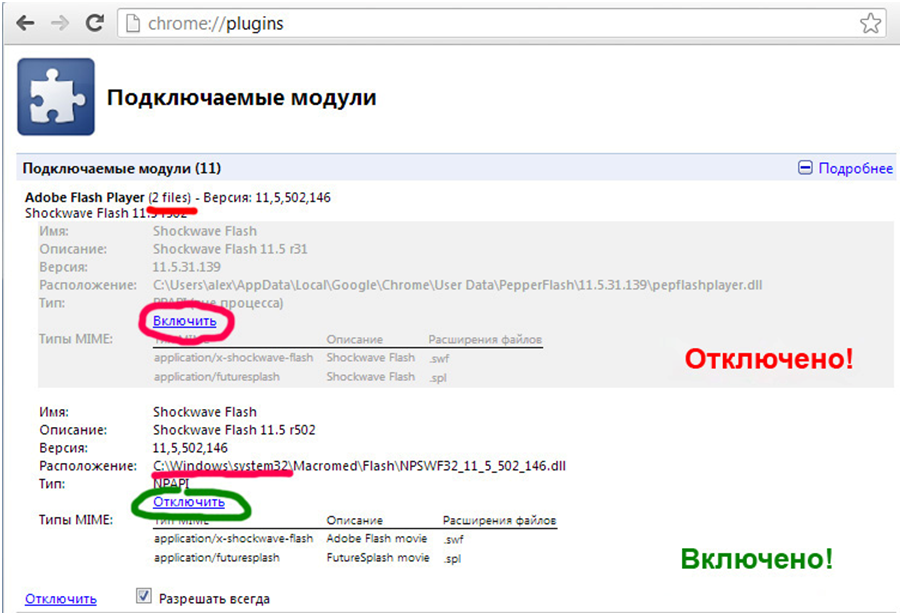
Open the Google Chrome browser settings page: chrome://plugins. Here you will see a list of all plugins installed on your browser. At the top of the list there will be a similar entry Adobe FlashPlayer (2files) - Version: 11,5,502, 146.

If the number of files in parentheses is more than one, then you need to perform the settings; if there is no square with a plus sign for "Details" next to it, then all settings are done, and after reloading the browser with the Flash application you can continue working with the Flavion Builder program.

If such a square exists, by clicking it you will see a list of all Flash plugins connected to your browser. Only one of them should be enabled; otherwise, your system will use multiple processes when running the application, which will significantly slow down the program's performance.

What needs to be done?

Disable all enabled plugins except one located in the Windows\ system 32\ folder, as it specifically provides maximum speed when running the application. It will look approximately like this:

[caption id="attachment_461" align="aligncenter" width="600"]Flash settings for Google Chrome Flash settings for Google Chrome[/caption]
Step 5. Reload the page with the Flash application. The Flash player's performance in the browser should significantly speed up.


Specifications

Views26 768

Reviews

1 reviews

  • Нина Ивановна 28.05.2018

    Cпасибо.

Site.articles.relatedCategory

Show more

The default welcome page of the Google Chrome browser looks, perhaps, empty and unclear. Now we'll figure out what a welcome page is and what it is for. [toc] When you start the browser, the first thing you see is the start page! It is also called the quick access page, or the welcome page. Welcome page - what is it? Actually, these are slightly different concepts, especially when it comes to the default welcome page of the Google Chrome browser. So, now we know what

151 556
Read
Customizing Google Chrome Tabs

Customizing Google Chrome Tabs

Google Chrome Setup
4.0

As practice shows, users prefer an "enhanced" tab page, i.e., one where tabs can be managed. Unfortunately, the standard version of Google Chrome lacks this feature :( However! Let's not forget the wonderful option of installing third-party add-ons! :) We're talking about Google Chrome extensions available in the Google Web Store. So, our goal is to upgrade the tab page to introduce this much-needed management capability.

15 328
Read
Saving settings in Google Chrome

Saving settings in Google Chrome

Google Chrome Setup
3.9

Users of the Google Chrome browser often ask a question related to saving settings. Since you are asking this question, we will now try to answer it in detail and with screenshots. To download the Russian free Google Chrome browser, use this link. First of all, you should tell where the Google Chrome browser settings are located? To go to the browser settings page, you need to click on the icon with 3 bars, as shown in the picture: In the appeared context menu

8 303
Read
Security settings in Google Chrome

Security settings in Google Chrome

Google Chrome Setup
4.7

Recently, people often wonder how to configure security in Google Chrome. A person knowledgeable in these matters knows that the security in the Chrome browser is perhaps the best possible at the moment. It's simple to explain. The Google Chrome browser is based on Chromium, which in turn is based on the freely distributed and world's best WebKit engine, which in turn works at the maximum possible speed and also provides the maximum possible security

7 043
Read

Site.articles.relatedPopular

Show more

By becoming a member of the Friend Around social network, you will ensure the opportunity for new acquaintances and find many friends! Every participating user in the social network has many friends and girlfriends, just new acquaintances in this network! Thanks to the modest application, you can often communicate with friends on common topics! Using the features of this social network, you can find your soulmate, and other users can help with this! [toc] On the website, you can quickly download the program and become a user of the Friend Around program

368 990
Read

How to download a Windows 7 ISO image from the Microsoft website? Today it is possible, there is no longer a need to search for the OS on the Internet, risking infecting your own computer with a virus. There are many different builds of this operating system on the web. It is best to download the original Windows 7 ISO image, as it is considered the best. You don't need to download it from torrent trackers, it is available on the Microsoft website. However, there are certain nuances. At the link https://www.microsoft.com/ru-ru/

107 053
Read

Social networks - they are used by absolutely everyone who uses the Internet, just as the phone once gained incredible popularity - today social networks enjoy incredible universal popularity. [toc] Perhaps in the near future every inhabitant of the Earth will have their own account in one or another social network. As a rule, it is impossible or quite difficult to delete an account in social networks; it still remains in the system, no matter what you do. The Social Network Friend Around is no exception - in which

103 258
Read

