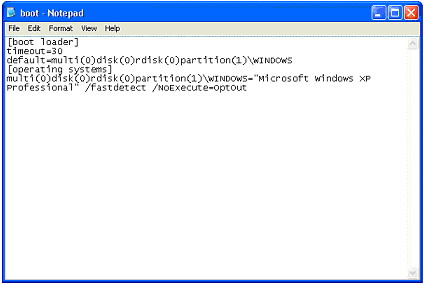
Typically, the BOOT.INI file is located in the root of the local drive "C", but this is only true for Windows operating systems no higher than XP. This file is hidden; to see it, you should enable the display of hidden files in Windows as follows:
- Click the "Start" button, go to "Control Panel", then find the "Folder Options" item and open it.
In the window that appears, go to the "View" tab, then in the list that appears, check the box next to "Show hidden files and folders". Now hidden Windows items will be displayed.
The BOOT.INI file is available for editing.
As for Windows 7 and later, the BOOT.INI file is absent; it has been replaced by a more flexible and better alternative called BCD. This new technology allows for booting systems that require not only BIOS but also others.
Editing the BOOT.INI file
The BOOT.INI file consists of sections.
[boot loader] timeout=30 default=multi(0)disk(0)rdisk(0)partition(3)\WINDOWS [operating systems] multi(0)disk(0)rdisk(0)partition(3)\WINDOWS="Windows Server 2003, Enterprise RU" /noexecute=optout /fastdetect multi(0)disk(0)rdisk(0)partition(2)\WINDOWS="Microsoft Windows XP Professional RU" /noexecute=optin /fastdetect C:\="Microsoft Windows"
Where the [boot loader] section:
- timeout= - Waiting time for the user to select an OS. Specified in seconds
- default= - Default OS. It will be selected if the time specified in the timeout parameter expires and the user has not yet chosen an OS
- redirect= - Port name
- redirectbaudrate= - Port speed
The [operating systems] section - information about installed OSes.
There are also two more sections:
- [multiboot] and [flexboot]
They are declared in C:\NTLDR, but little is known about them.
As a rule, this file is edited using special programs built into Windows. For example: MSCONFIG.EXE.
Text editors for editing the Boot.ini file
Good luck!