If your graphics card is overheating, you should not delay, because if you do nothing about it for a long time, the graphics card will at best burn out, and at worst, it can simply burst into blue flames, causing damage to the entire computer.
Overheating is very dangerous, remember this!
Why is your graphics card overheating at all?
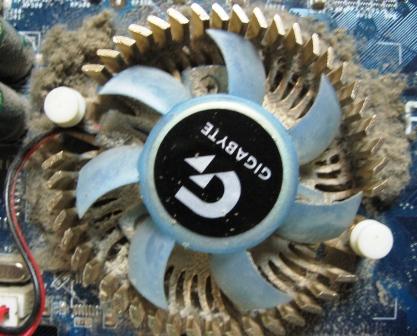
Most often, the problem lies in a weak cooler that simply cannot handle the load. In this case, you should simply replace it, or even better, install water cooling, which will be much more effective. The cooler should be expensive and definitely new, so that you can forget about the problem of overheating for a long time.
Overheating often occurs as a result of running powerful computer games, which in turn put a heavy load on the graphics card, and it cannot cope. In this case, we advise you to simply remove games that require a more powerful computer configuration than yours.
Also, it sometimes happens that overheating is caused by the user themselves, using programs to overclock the graphics card, processor, or other components. Remember that overclocking a graphics card or processor is a very dangerous process and is only suitable for highly professional computer technicians. And even professionals try not to do this, because it is still very dangerous - even in skilled hands.
By the way, most often it is precisely because of overclocking the graphics card or processor that computer equipment starts to catch fire. Under no circumstances should you try to overclock anything in your computer; it is better to simply buy a new, more powerful part and install it. Believe me - this will be much better and cheaper.
But, if you still want to try, we advise you to first install more powerful cooling, as this is exactly what computer overclocking professionals recommend. If you start overclocking on a computer that is not prepared for it, the consequences can be dire. It is best to install water cooling, as it cools the computer very effectively.
So, the causes of overheating are now known, but what should you do to fix the problem? If the above tips do not help you, we advise you to take the computer to a professional, because only they can effectively carry out repairs and fix the issue.
Good luck!