It is not uncommon to need to change the data structure type from FAT32 to NTFS, and the built-in Windows service will help us with this. For example, sometimes you have to change the data structure type of a flash card.
To change the data structure type to NTFS, right-click on the desired device and select "Format". 
By the way, after changing the data structure type to NTFS, all contents of the flash card will be erased. Therefore, we advise you to make a copy of the data on this flash card.
In general, let's start describing in detail how to change FAT32 to NTFS - you will be surprised, it is all quite easy and simple, read on for more details!
A window like this will open for you to change FAT32 to NTFS.
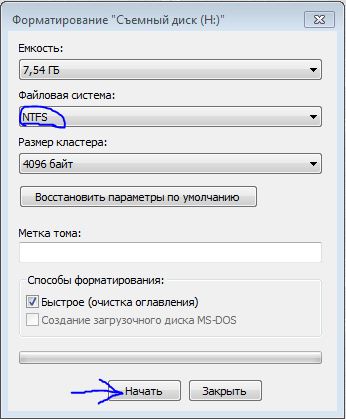 Select the NTFS file system type from the list and click the "Start" button. Wait a bit while the flash card is formatted and the file system type changes. After about 5 minutes (depending on the size of the flash card, the formatting process may take longer), the process will finish and a message "Formatting complete!" will appear, click the "OK" button.
That's all, the operation to change the file system type is complete.
You might be interested in programs on the site:
- Download alcohol 120 Russian free
- Download Virtual DJ free
- Download Skype free for windows
- Download free Russian version of Nero
- Download free version of Kaspersky antivirus
- Download Windows Movie Maker free
Good luck!