If you do not have a printer driver disk, you will have to search for the driver on the internet. This can be done very easily, you just need to know where and how to search. In this article, we will tell you about how to install a printer driver without a driver disk, that is, how to find a driver on the internet.
The Windows operating system provides the ability to find out the so-called "Device Code" for almost any device in the system, even if it is not identified. Having such a code on hand, you can easily find the required driver. So, to find out the special code for the desired device, you should open "Device Manager".
Launch the Control Panel, then type "Device Manager" in the search and select the corresponding item in the search results.
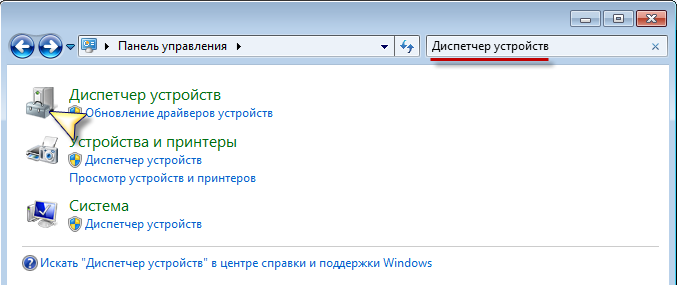
After that, "Device Manager" will open. Next, open the corresponding list and find your printer in it. Open the printer properties by right-clicking on the printer icon and selecting "Properties". In the window that appears, open the "Details" tab, and in the "Property" list, select "Hardware Ids".
In Windows XP, the name is different; there, the code we need is called "Hardware Code".
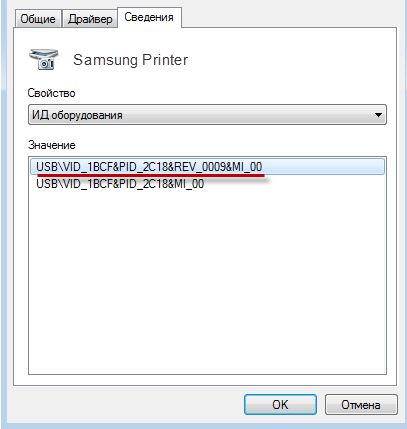
Copy this code (if there is more than one, take the first one) by pressing the key combination Ctrl+C, or right-click -> Copy. Now, go to the website https://www.devid.info and enter the copied hardware code in the search field, then click the "Search" button.
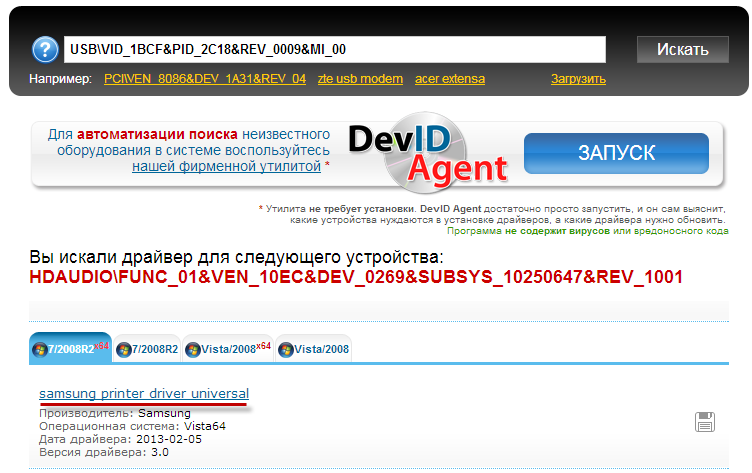
A list of search results will appear; select the first one from the list. The driver download page will open; on this page, click the button shown in the screenshot (it may differ from what is in the screenshot).

After the download is complete, run the driver installation. After installation, restart your computer and enjoy using your printer.
You might also be interested in programs on the site:
- Download alcohol 120 Russian free
- Download Virtual DJ free
- Download Skype free for Windows
- Download free Russian version of Nero
- Download free version of Kaspersky antivirus
- Download Windows Movie Maker free
Good luck!