Install Adobe Flash Player
Article PC Setup

Install Adobe Flash Player

3.7 (89 ratings) Hover and click a star to rate
Views
10 660
Rating
3.7 / 5
Reviews
11

Adobe Flash Player from Adobe is required to play Flash elements on websites: flash banners, Flash-based elements, and watch videos using a flash player. Without this player, browsers such as: Opera, FireFox, Google Chrome, Internet Explorer will typically display an error stating that the flash player is missing and that you need to install Adobe Flash Player on your computer to play Flash elements.

Installing Flash Player on your computer is very easy and simple; to do this, you should visit the official website - https://www.adobe.com/ru/products/flashplayer.html and download the appropriate product and the latest version of flash player from there. In some cases, you will need to install Adobe Flash Player as an additional plugin - in any case, the developer's website should offer this automatically.

Flash Player is distributed for free and you can download it for free on our website as well, the latest version is Flash Player 11. Installing Flash Player takes no more than 2-3 minutes, and does not require any additional components or actions from the user.

Starting the Adobe Flash Player Installation

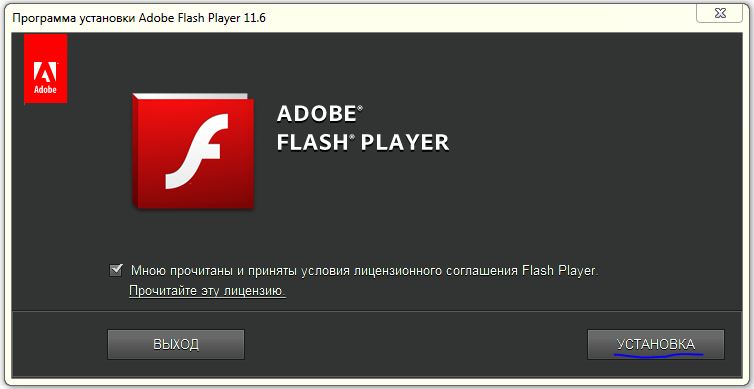
[caption id="attachment_1917" align="aligncenter" width="754"]skachat-i-ustanovit-adobe-flash-player1 Check the box to accept the terms and click the "INSTALL" button[/caption]
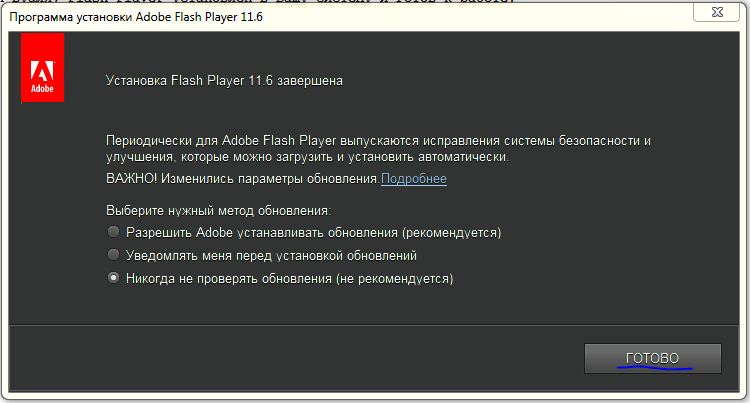
[caption id="attachment_1918" align="aligncenter" width="750"]skachat-i-ustanovit-adobe-flash-player2 Now the flash player is installed on your PC and you need to select the desired update type and click "FINISH". It is recommended to select the update type "Install updates automatically" - the 1st option.[/caption]
You just need to start the installation, wait a bit, and voila, Flash Player is installed on your system and ready to use. After that, you will be able to view any flash elements on websites and watch videos on flash players!

Specifications

Views10 660

Reviews

11 reviews

  • Программа З-НДФЛ 06.08.2016

    Так как популярность Флеш Плеер очень велика, его часто пытаются взломать и найти уязвимости с целью получить доступ к компьютеру для внедрения вирусов. По этой причине рекомендую следить за обновлениями Adobe Flash Player и регулярно скачивать последнюю полную версию.

  • Программа 3 НДФЛ 19.07.2016

    Так как популярность Флеш Плеер очень велика, его часто пытаются взломать и найти уязвимости с целью получить доступ к компьютеру для внедрения вирусов. По этой причине рекомендую следить за обновлениями Adobe Flash Player и регулярно скачивать последнюю полную версию.

  • Рубен 27.06.2016

    Привет всем. Помогите пожалуйста, у меня проблема, на компе стоит виндоус 7 и последняя версия флеш плеера, но когда надо просматривать видео или играть- автоматически не открывается, а постоянно запрашивает кликать на него и только после этого могу смотреть или играть. Раньше такого небыло. Благодарю за помощ.

  • Лилия 09.12.2015

    Я слышала недавно новость касательно того, что компания Adobe решила отказаться от своего детища - Flash. И это хорошая новость, так как этот назойливый плагин постоянно обновляется и еще ставит ненужный антивирусник.

  • Лариса 08.12.2015

    По больше бы вот таких статей, а то действительно иногда не знаешь где скачать и как установить какую нибудь программу.

  • Leo 08.12.2015

    На сегодня самый адекватный флеш плеер. К сожалению у Адоба какие-то разногласия с "Андроидом" и с мобильной версией "накладки"

  • Иван 08.12.2015

    Очень полезная инструкция для новичков! Очень помогла родителям, спасибо Вам!

  • Екатерина 08.12.2015

    Спасибо большое за статью, я с легкостью смогла скачать и установить программу!

  • Ирина 08.12.2015

    Скачала.Все получилось.Спасибо!

  • Миха 08.12.2015

    на сегодняшний день просто незаменимая программа для просмотра видео в инете!

  • Рамиль 08.10.2015

    Адобе флэш плеер установился отлично в автоматическом режиме, спасибо!

Site.articles.relatedCategory

Show more

It is not uncommon for the internet to occasionally disappear, or even disappear completely. Most often, people immediately call technical specialists or contact their internet provider's support service. However, the problem often lies in some small detail that can be easily fixed on your own! First of all: you should determine the source of the problem. Does your internet disappear every half hour, or every hour? Perhaps the internet connects and Windows reports that everything is fine, but

76 846
Read

If your graphics card is overheating, you should not delay, because if you do nothing about it for a long time, the graphics card will at best burn out, and at worst, it may catch fire with a blue flame, damaging the entire computer. Overheating is very dangerous, remember that! Why is your graphics card overheating at all? Most often, the problem lies in a weak cooler that simply cannot handle the load. In this case, you should simply replace it, or even better, install

26 757
Read

If Windows does not see the printer, the problem almost always lies in driver issues. However, we also recommend checking the clarity of the printer cable connections to the computer, as well as the functionality of the printer itself. If the connections are established and the printer is working, you should install/reinstall the printer driver in the Windows OS. This procedure is quite easy and will not take much time and effort. 1) Launch "Device Manager", to do this, open "Control Panel"

25 758
Read
Windows XP won't load

Windows XP won't load

PC Setup
4.7

It is not uncommon for users to experience that the Windows XP operating system does not load. As a rule, this happens for no apparent reason, since the OS was loading normally not long ago, and then problems suddenly arose. There can be many reasons for this, and there are a number of the most common causes why the OS stops loading. Also, you should pay attention to how exactly the OS does not load—whether it does not load at all or stops loading after the Windows XP logo with a progress bar appears.

11 384
Read

Site.articles.relatedPopular

Show more

By becoming a member of the Friend Around social network, you will ensure the opportunity for new acquaintances and find many friends! Every participating user in the social network has many friends and girlfriends, just new acquaintances in this network! Thanks to the modest application, you can often communicate with friends on common topics! Using the features of this social network, you can find your soulmate, and other users can help with this! [toc] On the website, you can quickly download the program and become a user of the Friend Around program

368 990
Read

The default welcome page of the Google Chrome browser looks, perhaps, empty and unclear. Now we'll figure out what a welcome page is and what it is for. [toc] When you start the browser, the first thing you see is the start page! It is also called the quick access page, or the welcome page. Welcome page - what is it? Actually, these are slightly different concepts, especially when it comes to the default welcome page of the Google Chrome browser. So, now we know what

151 556
Read

How to download a Windows 7 ISO image from the Microsoft website? Today it is possible, there is no longer a need to search for the OS on the Internet, risking infecting your own computer with a virus. There are many different builds of this operating system on the web. It is best to download the original Windows 7 ISO image, as it is considered the best. You don't need to download it from torrent trackers, it is available on the Microsoft website. However, there are certain nuances. At the link https://www.microsoft.com/ru-ru/

107 053
Read

Social networks - they are used by absolutely everyone who uses the Internet, just as the phone once gained incredible popularity - today social networks enjoy incredible universal popularity. [toc] Perhaps in the near future every inhabitant of the Earth will have their own account in one or another social network. As a rule, it is impossible or quite difficult to delete an account in social networks; it still remains in the system, no matter what you do. The Social Network Friend Around is no exception - in which

103 258
Read




