If after reinstalling Windows the sound is missing, but before reinstalling it was working, then the problem in 99% of cases is the absence of a sound driver. If you have a modern PC/Laptop, we recommend you download the High Definition Audio Driver, which can easily be found on the internet. Most often, installing this driver helps and the sound starts working. For example, this driver is used in Acer V3 and G series laptops.
Otherwise, if the sound still does not appear, we recommend you visit the website of your sound card manufacturer and download the driver from there. Also, you can find out which driver you need by using the special driver code. To do this, you need to go to the computer properties, then open Device Manager.
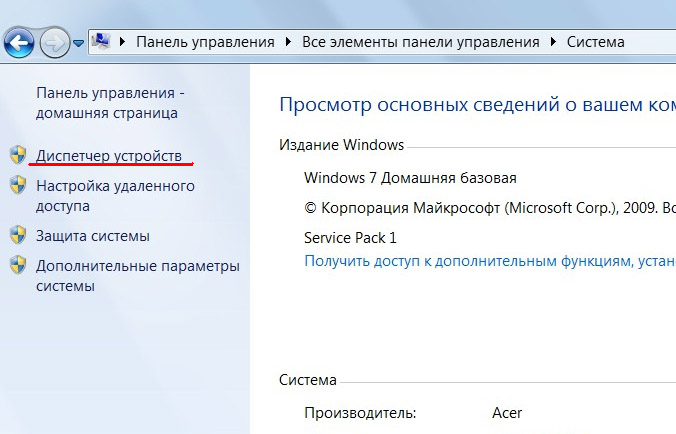
In the "Sound, video and game controllers" tab, find your sound card, then open its properties. After that, go to the "Details" tab, and in the list find the item with the hardware code. In Windows XP it is called "Device instance code", and in Windows 7 it is called "Hardware Ids". Copy this code by clicking on it to highlight it, and then press the key combination Ctrl+C.
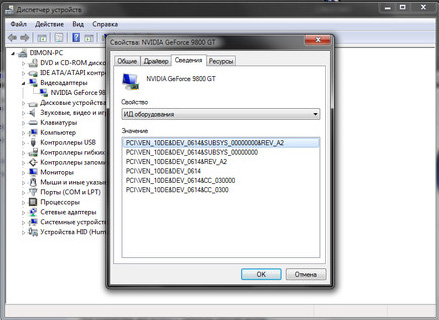
Now, open the website https://devid.info/ in your browser and in the "Enter driver code" field, paste the previously copied code (Ctrl+V).

Click the "Search" button and the corresponding driver will appear in the search results. Download and install it. The sound should appear.
You might also be interested in programs on the site:
- Download alcohol 120 Russian free
- Download Virtual DJ free
- Download Skype free for windows
- Download free Russian version of Nero
- Download free version of Kaspersky antivirus
- Download Windows Movie Maker free
Good luck!