Transferring Settings in Google Chrome

Transferring Settings in Google Chrome

3.7 (3 ratings) Hover and click a star to rate
Views
4 560
Rating
3.7 / 5
Как показывает статистика, браузер Google Chrome является самым популярным, а соответственно - лучшим на сегодняшний день. Им пользуются большинство пользователей интернета, особенно молодежь разбирающаяся в современных тенденциях. Исходя из такой популярности - не трудно предположить, что человек, пользующийся Хромом, использует его повсеместно на работе и дома или в путешествии. Сторонник Хрома будет использовать именно Google Chrome, а для того что бы download Chrome browser for free- перейдите по ссылке. Однако, возникает проблема, вопросом решения которой часто задаются обычные пользователи, а именно - How to transfer Google Chrome settings ? Например: Вы используете браузер дома и на работе. Дома в свободное время Вы настроили браузер так, как Вам этого хотелось. Однако на работе у Вас совсем другой компьютер, но с тем же браузером Google Chrome. Перенастраивать браузер еще раз желания чаще всего нет. Да и при каждой перенастройке Вам придется делать все снова. Именно поэтому, лучшим решением данной проблемы является перенос настроек браузера.

What is the process of transferring settings?

Процесс, надо отметить, очень простой, за что следует благодарить разработчиков Хрома. Не придется использовать флешки и др. методы передачи файлов между компьютерами, что бы перенести настройки. К счастью, Google Chrome лишен столь неэффективных и трудоемких методов переноса настроек :) Все гораздо проще, чем это можно себе представить.

Transfer process

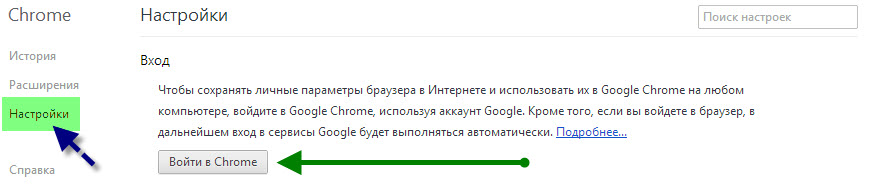
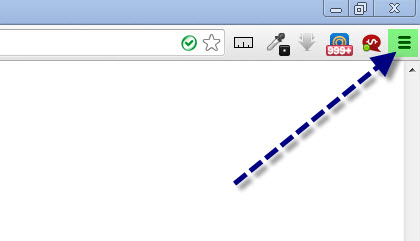
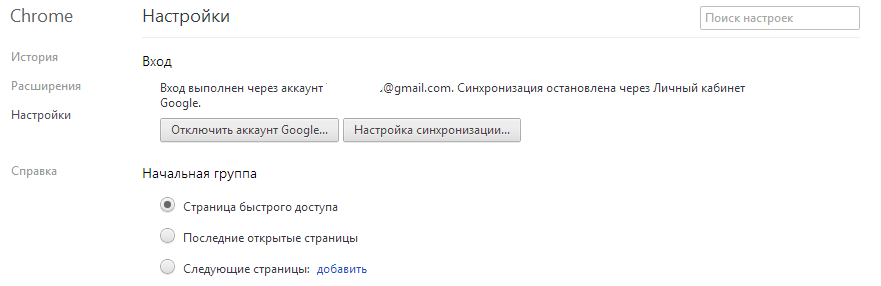
Вам надо зарегистрироваться на Google.com, после чего авторизоваться с помощью Вашей учетной записи. Что бы это сделать, перейдите в настройки. perenos-nastroek-v-google-chrome Теперь, переходим во вкладку "Settings".
perenos-nastroek-v-google-chrome

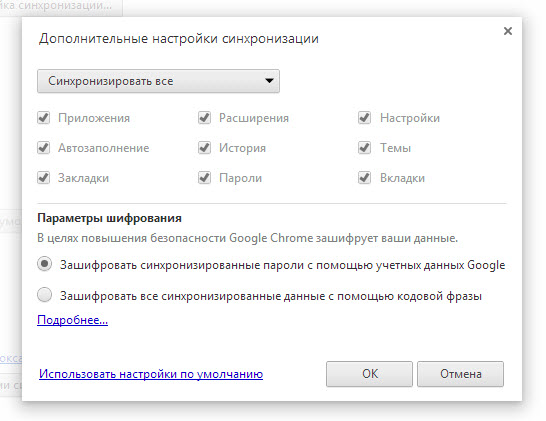
Здесь нажимаем на кнопку "Sign in to Chrome", после чего попадаем на страницу авторизации. Обязательно обращайте внимание на протокол соединения с сайтом, на который Вас перенаправят. Вы должны попасть на домен с протоколом HTTPS : В противном случае, leave the site и откройте the real one, после чего авторизуйтесь именно там. Итак, Вы авторизовались, поздравляем! Большая часть дела сделана :) Теперь, на странице настроек перед Вам должна появиться страница синхронизации настроек, а именно chrome://settings/syncSetup:
perenos-nastroek-v-google-chrome

Все что Вам осталось сделать, это выбрать параметры синхронизации настроек, после чего нажать на кнопку "Ок". Кстати, если галочки не реагируют на клик, попробуйте сменить тип синхронизации с "Sync everything" на "Choose objects to sync".
perenos-nastroek-v-google-chrome

На этом все, поздравляем Вас! Теперь Вы умеете синхронизировать настройки браузера Google Chrome! Совет: Используйте 1 аккаунт Google Chrome, что бы синхронизировать настройки браузера, где бы Вы не находились. Старайтесь не торопиться и делать все так, как это описано выше, и у Вас обязательно все получится! Успехов!

Specifications

Views4 560

Site.articles.relatedCategory

Show more

The default welcome page of the Google Chrome browser looks, perhaps, empty and unclear. Now we'll figure out what a welcome page is and what it is for. [toc] When you start the browser, the first thing you see is the start page! It is also called the quick access page, or the welcome page. Welcome page - what is it? Actually, these are slightly different concepts, especially when it comes to the default welcome page of the Google Chrome browser. So, now we know what

151 556
Read
Configuring Flash for Google Chrome

Configuring Flash for Google Chrome

Google Chrome Setup
3.8

Sometimes in the Google Chrome browser, Flash Player crashes or overloads the browser itself. For this, we have detailed 3 steps on how to optimize Flash Player's performance for maximum speed in the browser. By the way, those who have not yet downloaded the Google Chrome browser can download it from our website on this page. For the fastest performance of Flash applications in the Google Chrome browser, it is very important to configure it correctly. The speed of operation largely depends not on the player used in the browser, but on

26 768
Read
Customizing Google Chrome Tabs

Customizing Google Chrome Tabs

Google Chrome Setup
4.0

As practice shows, users prefer an "enhanced" tab page, i.e., one where tabs can be managed. Unfortunately, the standard version of Google Chrome lacks this feature :( However! Let's not forget the wonderful option of installing third-party add-ons! :) We're talking about Google Chrome extensions available in the Google Web Store. So, our goal is to upgrade the tab page to introduce this much-needed management capability.

15 328
Read
Saving settings in Google Chrome

Saving settings in Google Chrome

Google Chrome Setup
3.9

Users of the Google Chrome browser often ask a question related to saving settings. Since you are asking this question, we will now try to answer it in detail and with screenshots. To download the Russian free Google Chrome browser, use this link. First of all, you should tell where the Google Chrome browser settings are located? To go to the browser settings page, you need to click on the icon with 3 bars, as shown in the picture: In the appeared context menu

8 303
Read

Site.articles.relatedPopular

Show more

By becoming a member of the Friend Around social network, you will ensure the opportunity for new acquaintances and find many friends! Every participating user in the social network has many friends and girlfriends, just new acquaintances in this network! Thanks to the modest application, you can often communicate with friends on common topics! Using the features of this social network, you can find your soulmate, and other users can help with this! [toc] On the website, you can quickly download the program and become a user of the Friend Around program

368 990
Read

How to download a Windows 7 ISO image from the Microsoft website? Today it is possible, there is no longer a need to search for the OS on the Internet, risking infecting your own computer with a virus. There are many different builds of this operating system on the web. It is best to download the original Windows 7 ISO image, as it is considered the best. You don't need to download it from torrent trackers, it is available on the Microsoft website. However, there are certain nuances. At the link https://www.microsoft.com/ru-ru/

107 053
Read

Social networks - they are used by absolutely everyone who uses the Internet, just as the phone once gained incredible popularity - today social networks enjoy incredible universal popularity. [toc] Perhaps in the near future every inhabitant of the Earth will have their own account in one or another social network. As a rule, it is impossible or quite difficult to delete an account in social networks; it still remains in the system, no matter what you do. The Social Network Friend Around is no exception - in which

103 258
Read