Most often, the solution to this problem is the "USB Keyboard Support" parameter in the BIOS, which is set to "Disabled". To fix this issue, you should open the BIOS settings. To enter the BIOS settings, press the "DEL" key when the computer is turning on, after which you will enter the BIOS settings.
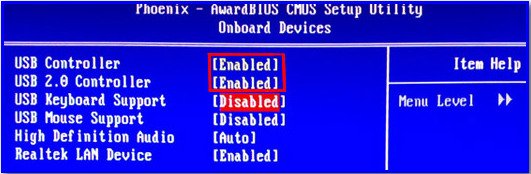
Note that the "USB Keyboard Support" parameter is disabled. Enable the first 4 parameters listed in the screenshot, then press the "F10" key to save the settings and restart the computer.
This method should definitely help.
Otherwise, try checking the connection clarity of the USB keyboard with the computer. Also, we recommend that you install/reinstall the driver for your USB keyboard. Try connecting the USB keyboard to another USB port if you have several. Attempt to check the functionality of the USB port itself by inserting a Flash drive into it. If the port does not work, we advise you to contact professionals to replace the USB port.
You may also be interested in programs on the site:
- Download alcohol 120 Russian free
- Download Virtual DJ free
- Download Skype free for Windows
- Download free Russian version of Nero
- Download free version of Kaspersky antivirus
- Download Windows Movie Maker free
Good luck!