FireFox Establish a secure connection

FireFox Establish a secure connection

4.0 (9 ratings) Hover and click a star to rate
Views
20 679
Rating
4.0 / 5
Reviews
2

Sometimes the free browser FireFox establishes a so-called "secure connection" with a site, meaning that FireFox encrypts the connection and also verifies the site’s certificate. These measures are necessary to protect the user from all kinds of fraudulent schemes, viruses, etc. However, such measures are sometimes unnecessary and simply prevent the user from visiting websites.

In that case, you can disable such checks. If, when visiting websites, you too often see the message "This connection is not trusted You asked Firefox to establish a secure connection with 'site', but we cannot guarantee that this connection is secure", you can turn off this warning.

To do this, go to the security settings of FireFox, where you will find the settings you need.

[caption id="attachment_1179" align="aligncenter" width="600"]FireFox Establish secure connection FireFox Establish secure connection[/caption]
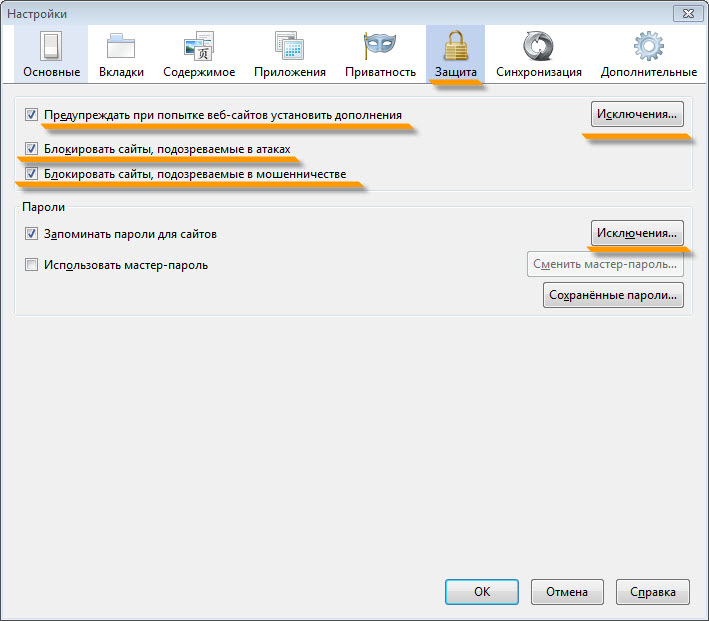
However, by disabling checks, you expose your computer to danger, so we advise you to do so only as a last resort. Even better, use "Exceptions" to allow access to the sites you visit and block all unsafe ones.

Good luck!
Specifications

Views20 679

Reviews

2 reviews

  • mp3-vk.ru 07.12.2016

    Сертификаты безопасности в браузере Mozilla Firefox хранятся в профиле пользователя в файле «cert8.db». Этот файл может быть поврежден, поэтому возникает ситуация с недействительным сертификатом безопасности.

  • Нейля 10.09.2014

    Спасибо за помощь! Боюсь, предложенный вами вариант - не наш. FireFox - реально мой любимый браузер, но на компьютере есть и другие. Надпись насчет недоверенного соединения и другие страшилки стала появляться ровно три дня назад - компьютер потух и мы самостоятельно (не вызывая мастера) поменяли батарейку. С тех пор все и началось. Думали, блокируются наши выходы, так как предпочтительно смотрим российские информационные сайты. Но блокирована и почта укр.нет со всех браузеров. Куда же обратиться? Доктор Веб на самом компе обнаружил одного троянца и благополучно уничтожил... Пожалуйста, дайте профессиональный совет! Спасибо вам за внимание! Н. Юсупова

Site.articles.relatedCategory

Show more
Setting up the Firefox start page

Setting up the Firefox start page

FireFox Settings
4.0

The first thing we see when we launch the Firefox browser is the start page. Every user has their own idea of what should be on the welcome page. Everyone customizes their start page the way they want. For example, you can use the standard Firefox browser start page customization tools. Also, you can set up your own custom option. You can install special add-ons that greatly enhance your welcome page.

17 645
Read
Customizing the FireFox Toolbar

Customizing the FireFox Toolbar

FireFox Settings
3.6

The FireFox toolbar provides easy and quick access to all sorts of typical browser functions. It's a very convenient bar, thanks to which the user can easily access one or another feature of the FireFox browser. Today we will talk about how to set up this toolbar in FireFox. How to show or hide toolbars in the FireFox browser. The vast majority of toolbars in FireFox can be either hidden or shown. What will be displayed and what won't.

9 195
Read
Firefox cannot find the server

Firefox cannot find the server

FireFox Settings
2.8

Sometimes it happens that Firefox, when requesting a particular site, responds with a message that the server cannot be found. There are quite a few reasons for this error, ranging from trivial to viruses. First of all, when such an error occurs, you should check whether the requested resource exists at all. Also, check if the internet connection is active. Sometimes it happens that no website opens at all; in that case, we recommend you check the Hosts file. Maybe a virus is at work,

7 726
Read
Configuring Hot Keys in FireFox

Configuring Hot Keys in FireFox

FireFox Settings
2.6

By default, the FireFox browser does not provide the ability to configure hot keys. However, this can be done by installing special add-ons. Specifically, there is an add-on called FireFox KeyConfig that allows you to configure hot keys. This extension, by the way, is available for both Mozilla Firefox and Mozilla Thunderbird. You can view the standard hot keys at http://support.mozilla.com/ru/kb/Keyboard+shortcuts Extension for burning keys in the Mozilla FireFox browser Download extens

6 648
Read

Site.articles.relatedPopular

Show more

By becoming a member of the Friend Around social network, you will ensure the opportunity for new acquaintances and find many friends! Every participating user in the social network has many friends and girlfriends, just new acquaintances in this network! Thanks to the modest application, you can often communicate with friends on common topics! Using the features of this social network, you can find your soulmate, and other users can help with this! [toc] On the website, you can quickly download the program and become a user of the Friend Around program

368 990
Read

The default welcome page of the Google Chrome browser looks, perhaps, empty and unclear. Now we'll figure out what a welcome page is and what it is for. [toc] When you start the browser, the first thing you see is the start page! It is also called the quick access page, or the welcome page. Welcome page - what is it? Actually, these are slightly different concepts, especially when it comes to the default welcome page of the Google Chrome browser. So, now we know what

151 556
Read

How to download a Windows 7 ISO image from the Microsoft website? Today it is possible, there is no longer a need to search for the OS on the Internet, risking infecting your own computer with a virus. There are many different builds of this operating system on the web. It is best to download the original Windows 7 ISO image, as it is considered the best. You don't need to download it from torrent trackers, it is available on the Microsoft website. However, there are certain nuances. At the link https://www.microsoft.com/ru-ru/

107 053
Read

Social networks - they are used by absolutely everyone who uses the Internet, just as the phone once gained incredible popularity - today social networks enjoy incredible universal popularity. [toc] Perhaps in the near future every inhabitant of the Earth will have their own account in one or another social network. As a rule, it is impossible or quite difficult to delete an account in social networks; it still remains in the system, no matter what you do. The Social Network Friend Around is no exception - in which

103 258
Read