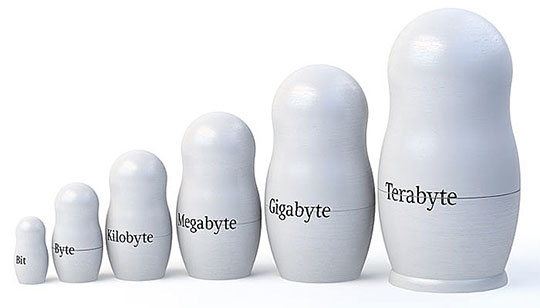
As a rule, internet connection speed is measured in bits, and file size in bytes.
- 1 byte is 8 bits, and conversely, 8 bits is 1 byte.
However, imagine you have a high internet connection speed; you are unlikely to say "I have 57.344 bits." It is much easier to say "I have 56 kbytes," isn't it? Or, you could say "I have 8 kbits," which is actually exactly 56 kbytes, or 57.344 bits.
Let's figure out in more detail how many megabits are in a megabyte.
The smallest unit of measurement for speed or size is the Bit, followed by the Byte, etc. Where, in 1 byte there are 8 bits, that is, saying 2 bytes actually means 16 bits. Saying 32 bits actually means 4 bytes. That is, such units of measurement as bytes, kbits, kbytes, mbits, mbytes, gbits, gbytes, etc. were invented so that you wouldn't have to say or write long numbers.
Just imagine if these units of measurement did not exist, how would you measure the same gigabyte? Since 1 gigabyte equals 8,589,934,592 bits, isn't it more convenient to say 1 Gbyte than to write such long numbers?
We already know what 1 bit is and what 1 byte is. Let's move on.
There are also units of measurement "kbit" and "kbyte," also called "kilobit" and "kilobyte."
- Where, 1 kbit is 1024 bits, and 1 kbyte is 1024 bytes.
That is:
- 1 kbyte = 8 kbits = 1024 bytes = 8192 bits
In addition, there are also "mbits" and "mbytes," also called "megabits" and "megabytes."
- Where, 1 mbit = 1024 kbits, and 1 mbyte = 1024 kbytes.
From this it follows that:
- 1 mbyte = 8 mbits = 8192 kbytes = 65536 kbits = 8388608 bytes = 67108864 bits
If you think about it, everything becomes simple.
Now do you guess how many megabits are in a megabyte?
It will be difficult at first, but you will get used to it. Try taking the easy route:
- 1 megabyte = 1024 kbytes = 1048576 bytes = 8388608 bits = 8192 kbits = 1024 kbytes = 8 mbits
- That is, in 1 megabyte = 8 megabits.
- Similarly, in 1 kilobyte = 8 kilobits.
- Just like in 1 byte = 8 bits.
Isn't it easy?
For example, you can find out the time it will take to download a particular file. Suppose your internet connection speed is 128 kilobytes per second, and the file you are downloading from the internet weighs 500 megabytes. How long do you think it will take to download the file? Let's calculate.
To find out, you just need to understand how many kilobytes are in 500 megabytes. This is easy to do; just multiply the number of megabytes (500) by 1024, since there are 1024 kilobytes in 1 megabyte. We get the number 512000, which is the number of seconds it would take to download the file, given a connection speed of 1 kilobyte per second. But, our speed is 128 kilobytes per second, so we divide the resulting number by 128. That leaves 4000, which is the time in seconds it will take to download the file.
Converting seconds to minutes:
- 4000 / 60 = ~66.50 minutes
Converting to hours:
- ~66.50 / 60 = ~1 hour 10 minutes
That is, our file of 500 megabytes will download in 1 hour 10 minutes, assuming the connection speed remains exactly 128 kilobytes per second throughout the entire time, which equals 131,072 bytes, or, to be more precise, 1,048,576 bits.
You might be interested in programs on the site:
- Download alcohol 120 Russian free
- Download Virtual DJ free
- Download Skype free for windows
- Download free Russian version of nero
- Download free version of Kaspersky antivirus
- Download Windows Movie Maker free
Good luck!