Recently, users have increasingly been asking about security in the Opera browser, but they often confuse it with network security. We are talking about viruses, spam, and other horrors roaming the expanses of the internet. In essence, Opera, like any other browser, provides the maximum possible security, sometimes even warning of danger. Download the free Opera browser.
However, you yourself must keep your nose to the wind, because you can catch a virus online very quickly. Moreover, users often do not even suspect that a virus has paid them a visit. This continues until the virus makes itself known. It usually becomes apparent when it launches a massive attack on the entire system, or on a particular part of it.
Modern viruses instantly kill the Install and Task Manager services, so that the user feels helpless. And then, when the system is essentially "laid out," the virus begins its subversive activities. However, let's take a look at what security settings Opera provides us.
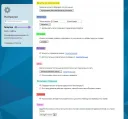
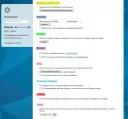
Master Password
Serious projects such as banks, online stores, search engines, and others, issue you so-called client certificates in order to identify you in the system. Naturally, such certificates are stored on the local computer and are easy to access. That is why you can set a master password on such certificates to protect them. This type of protection can also be used to safeguard your saved passwords.
Fraud Protection
When fraud protection is enabled, Opera warns you about potentially dangerous websites. That is, Opera essentially knows fraudsters by sight and alerts you, and whether to visit such a site or not is up to you.
Auto-Update
Opera has a built-in browser auto-update mechanism; this is extremely important because new browser versions fix bugs, including security holes. Therefore, definitely enable the auto-update option.
Summary of security settings in Opera browser
Never visit suspicious sites, check for the HTTPS protocol on relevant sites, and be sure to update Opera. These simple precautions will protect your computer from dangerous viruses and fraudsters.
Good luck!