Articles & Guides

Software reviews, how-to guides, comparisons and tips.

153 articles found

The FireFox browser uses profiling to save settings. That is, the settings are tied to a particular profile. As a rule, immediately after installation and the first launch of FireFox, standard settings are created automatically. The standard profile is called - Default. FireFox stores these profiles not in the browser's root folder, but in the Application Data folder. To access the FireFox profiles folder in Windows, you must go to the following path: C:\Documents and Settings\YOUR_WINDOWS_NAME\Appli

5 660
Read

All users customize their free browser to their liking; everyone wants the browser to work as they wish. It's no secret that the Google Chrome browser for Windows 7 is one of the best and most powerful browsers today, and therefore offers a lot of possible settings compared to browsers like Opera, Firefox, Safari, Yandex Browser. Starting from appearance settings, font installation, and ending with browser behavior settings in certain cases. Moreover, all possible browser settings are divided

5 366
Read

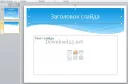
Not so long ago, a beautiful presentation with slides and music was available to few, and in most cases it was made in specialized centers for a lot of money. Now, every user has the opportunity to create an impressive presentation. With such a wonderful program as Microsoft Power Point, you can quickly and easily create beautiful presentations in Power Point for coursework and diploma projects, work presentations, etc. There are many programs for creating presentations, but the

5 345
Read
Speeding Up Windows 7

Speeding Up Windows 7

PC Setup
4.4

Very often users ask the question of how to speed up Windows 7, because by default the OS uses many system-loading modules, services, and effects. This negatively affects the speed of Windows, namely, the speed of launching programs, executing commands, and the like. This happens because the processor stops processing incoming commands quickly, as there are too many commands. The principle of processor operation Imagine that your processor is in a standard state

5 276
Read
Setting up AdBlock in Opera

Setting up AdBlock in Opera

Opera Setup
5.0

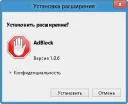
Perhaps the main problem for internet users today is blocking ads in Opera, pop-up windows and all such things. It is difficult for an ordinary user to deal with such problems, especially a beginner - because advertising follows us absolutely everywhere! Pop-up windows/ads and all similar things - must be blocked with special free ad-blocking programs. How can pop-up windows and ads harm your computer? Let's start with the fact that advertising is everywhere, advertising there, advertising here, everywhere one ad

5 108
Read
Hard drive is slow

Hard drive is slow

PC Setup
3.3

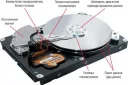
Hard drive is slow, what to do? The reason for the slow operation of the hard drive may be a lack of RAM or poor processor performance. Also, the problem may be that the hard drive is damaged or already old, which can quite realistically lead to the hard drive slowing down when the computer or laptop is running. First of all: we advise you to check the cooler, perhaps it is not working properly and therefore the system is unstable. If possible, check the temperature of the computer, it should not be higher than normal.

4 775
Read

Using computers or laptops running on the Windows operating system, sooner or later you will need additional software for working with text, graphics, and protection against various viruses. You should not look for such software on unverified sources, because every day more and more unscrupulous people will try to introduce trojans, viruses, and various malicious software onto your workstations for their own personal gain. To avoid becoming another victim, you need to download your

4 650
Read
Transferring Settings in Google Chrome

Transferring Settings in Google Chrome

Google Chrome Setup
3.7

As statistics show, the Google Chrome browser is the most popular, and accordingly - the best to date. It is used by the majority of internet users, especially young people who understand modern trends. Given such popularity, it is not difficult to assume that a person who uses Chrome uses it everywhere at work, at home, or while traveling. A supporter of Chrome will use Google Chrome, and in order to download the Chrome browser for free - follow the link

4 560
Read
Setting Up a New Tab in FireFox

Setting Up a New Tab in FireFox

FireFox Settings
3.0

One of the most popular internet browsers today is the FireFox browser, which has long held leading positions in the browser market. And of course, this wonderful browser does not stand still but develops, with new versions bringing new features and changes. Today we will talk about how to set up a new tab in FireFox. By default, FireFox opens a page with tabs, namely, a page with the most visited sites. As we see, there are only tabs with the most

4 480
Read

The Mozilla FireFox browser uses a profile system to store user settings, including bookmarks. Often the question of exporting/importing FireFox settings arises, and in particular importing and exporting bookmarks. In order to import, and incidentally also export, FireFox settings, you need to go to the FireFox profiles folder. In the Windows operating system family, FireFox stores its profiles at the path - C:\Documents and Settings\YOUR_WINDOWS_NAME\Application Data\Mozilla\Firefox\Profiles\SOME-

4 371
Read

The relatively recently released Windows 8 OS is already available in almost all relevant stores. The average cost of a licensed version of Windows 8 is 4,000 rubles. However, pirated copies of this OS are also available on the internet. We strongly advise you to purchase only a licensed version of Windows 8, as problems with activation or updates may arise. Also, pirated versions of this OS may have operational issues. So, for example, let's take Windows 8 PRO 64-bit Rus. In case your

4 358
Read

If sound disappeared after reinstalling Windows, but it was working before the reinstallation, then in 99% of cases the problem is the absence of a sound driver. If you have a modern PC/laptop, we recommend downloading the High Definition Audio Driver, which can easily be found on the internet. Most often, installing this driver helps and sound starts working. For example, this driver is used in Acer V3 and G series laptops. Otherwise, if the sound still does not appear, we recommend you visit

4 296
Read

Creating user accounts in Windows and assigning them a password is a fairly common practice, it helps to at least somewhat protect your virtual space from unwanted guests if several users share one computer. [toc] Often this method is used to prevent children from playing on the computer when parents are not at home. If you set a complex password and do not write it down somewhere, it is very easy to forget it. Windows provides a hint, but the user sets it themselves and may end up in a

4 285
Read

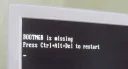
Typically, the BOOTMGR is missing error in Windows 7 occurs when the Windows bootloader fails or the BOOT settings in the BIOS are reset. Fixing this problem is quite simple. First, you should launch the Windows Recovery Console. To do this, press the F8 key during BIOS startup, after which a window will appear with options for booting the computer. Select the boot option "Troubleshoot your computer." If this option is missing, try inserting the recovery disk

4 276
Read

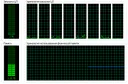
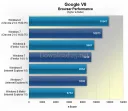
Popular resource Tom’s Hardware, known for its articles about hardware, recently tested the 4 most popular browsers and determined which browser works best in the Windows 8 operating system. The browsers selected for testing were: Internet Explorer 10, Google Chrome, Opera 12.10, and Firefox 16. The hardware used for the tests was quite powerful, but not the most advanced, to be precise: Intel Core i5, 8 Gb DDR3, Geforce GTX 560 Ti. To obtain a more accurate result, were executed

4 224
Read

With the release of the Windows 8 operating system, people have increasingly been asking which antivirus to install on this OS. Perhaps any, however, stability on Windows 8 is only guaranteed when using specialized antivirus software. [toc] First, we should discuss how Windows 8 differs from other operating systems, and why not every antivirus is suitable for this OS. So, as we all know, the Windows 8 OS is radically different from its counterparts

4 223
Read

What is a router? It is a device that is a fairly powerful mini-computer with a processor and memory – both RAM and ROM. Using a router, you can combine various computer devices, tablets, and smartphones into one local network and connect them to an internet access point. A home network can include: desktop PCs; laptops; printers; scanners; Smart TVs; tablets; smartphones. Thus, all participants, by connecting to the router,

4 193
Read
Advanced Opera settings

Advanced Opera settings

Opera Setup
5.0

Everyone knows that Opera recently switched to the WebKit engine. Some liked it, while others stayed on versions 12.x :) The latest versions of the Opera browser have introduced some new features and, accordingly, settings. Let's discuss some interesting Opera browser settings. For those who don't know yet, you can download the Opera browser for free in Russian here. How to access Opera settings? To go to the Opera browser settings page, you need to click on the "Ope

4 175
Read

As is known, video or audio files take up a large amount of memory on the hard drive, which accordingly causes some inconvenience. For example, transferring a large file over a network can be an extremely difficult task, since transferring large files takes a lot of time. And it will not be possible to store many such files on a computer, since disk space is not infinite. To solve this problem, information encoding technology was invented for the purpose of compressing it. To be more precise, it was invented

4 020
Read

Typically, internet connection speed is measured in bits, while file sizes are measured in bytes. 1 byte is 8 bits, and conversely, 8 bits is 1 byte. However, imagine you have a high internet connection speed; you are unlikely to say "I have 57.344 bits." It is much easier to say "I have 56 kbytes," isn't it? Or, you could say "I have 8 kbits," which is actually exactly 56 kbytes, or 57.344 bits. Let's take a closer look at how many megabits are in a megabyte. The smallest unit of measurement for speed or size is

3 914
Read